Skip to content
Join our Discord for updates & support Discord

Botany Pots – Decorative Pots That Grow and Auto-Replant Crops V3.1.2

—/5, 0 ratings

Your rating

Creator: Darkhax

File verified — safe
All 64 security engines found this file clean.
Last checked: 2026-06-13
Security report

Features:

  • Botany Pot block that can grow all kinds of crops
  • Harvesting a crop automatically replants the same seed
  • Hopper Botany Pot upgrade harvests itself and puts items into a chest or other inventory
  • Seventeen different pot colours for decoration
  • Crops need the right soil: dirt for wheat, soul sand for nether wart
  • Bone meal and other fertilizers speed up growth
  • Sneak and right-click with an empty hand to pull items back out
  • Extensive datapack support for adding new crops, soils and fertilizers
  • CraftTweaker support for adding, modifying and removing entries
  • Built-in crop data for Biomes O’ Plenty, Botania, Mystical Agriculture, Harvestcraft, Quark and more
  • Fabric and Quilt support for Minecraft 1.21.1
  • Made by Darkhax

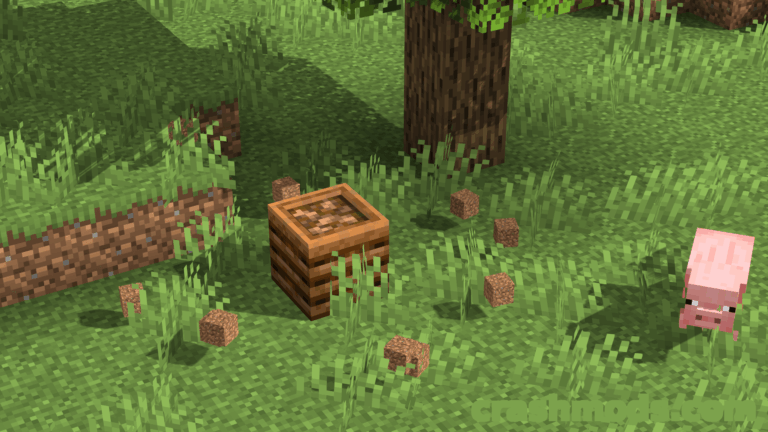
Botany Pots turns crop growing into a single compact block. Place a pot, right-click it with a soil block and then with a seed, and the crop starts growing inside the pot itself. Because one block holds both the soil and the plant, you can grow crops indoors in Minecraft without laying out an entire field, and the pots look good enough to use as pure decoration.

Growth takes a while, but bone meal and other fertilizers speed it along. Once a crop is ready, right-clicking harvests it and immediately replants the same seed, so a pot keeps producing without any further setup. Adding the hopper upgrade turns the pot into a small automatic farm: it harvests itself and puts the items into a chest or any other block with an inventory. To empty a pot by hand, sneak and right-click it with an empty hand, or simply break it.

Crops are picky about their soil, with wheat wanting dirt and nether wart wanting soul sand, and seventeen pot colours let you match the block to whatever you are building around it. All of the crop, soil and fertilizer data lives in predefined data files, so datapacks and CraftTweaker scripts can add, change or remove entries for any mod you like. Ready-made data already covers packs such as Biomes O’ Plenty, Botania, Mystical Agriculture, Harvestcraft, Buzzier Bees, Quark, Simple Farming and XL Food Mod.

✅ Description reviewed by the CrashMods Team

Changelog

V3.1.2 — First release.
Frequently asked questions6 questions

Botany Pots – which game and version is it for?

This mod was made for Minecraft (game version: 1.21.1). The mod's own version: V3.1.2. After a major game update, older mods may stop working — check the version before installing.

Botany Pots – how do I install it?

Install the mod loader that matches the mod's Minecraft version (Forge or Fabric), then put the .jar file in the .minecraft/mods folder.

Is the download safe?

We checked the file with VirusTotal: none of the 64 antivirus engines flagged it. The full report opens from the "Verified" badge on the mod's page.

How big is the download?

The mod's file size is about 1.1 MB.

Botany Pots – who made it?

The mod's original creator: Darkhax.

Is the mod free?

Yes, downloading from CrashMods is free; registration is not required.

Download Get the latest version of this mod and enjoy!

Mod version: V3.1.2 Minecraft 1.21.1 2 months ago 1.1 MB
Botany Pots – Decorative Pots That Grow and Auto-Replant Crops V3.1.2 1.1 MB Minecraft Download File

The file is on ModsDrop, our own storage.

  • Scannedwith VirusTotal
  • EU serversFast & reliable
  • Free downloadNo registration needed
  • Latest versionAlways up to date

More Minecraft Food mods

Uploaded by

Tabornok3
Tabornok3 LITE
  • 2,191 mod
  • 1 follower
  • 3,277 download
  • Registered 4 months ago

Community screenshots

Screenshots from players using this mod. Add yours — images only (JPG, PNG, WebP).

No community screenshots yet — be the first!

Leave a comment

Stay in the loop

Get the latest mods & updates in your inbox.

✓ Thanks! We will keep you posted.

💬
New mods & updatesBe the first to know.
🛡️
Verified & safeQuality checked by our team.
🎁
Community perksEvents, contests & more.

© 2026 CrashMods — All rights reserved.
Safe & TrustedEvery mod is scanned and reviewed to ensure a safe experience.
SecureYour safety is our priority.