Skip to content
Join our Discord for updates & support Discord

Skyblock Enhanced Storage – Unified Searchable Overlay for Ender Chests and Backpacks V9.7.0

0 downloads
207.4 KB file size
0 comments
0 videos
Minecraft More Minecraft Mods Explore more high-quality Minecraft mods. Browse Mods

—/5, 0 ratings

Your rating

Creator: Kd_Gaming1

File verified — safe
All 65 security engines found this file clean.
Last checked: 2026-08-31
Security report

Features:

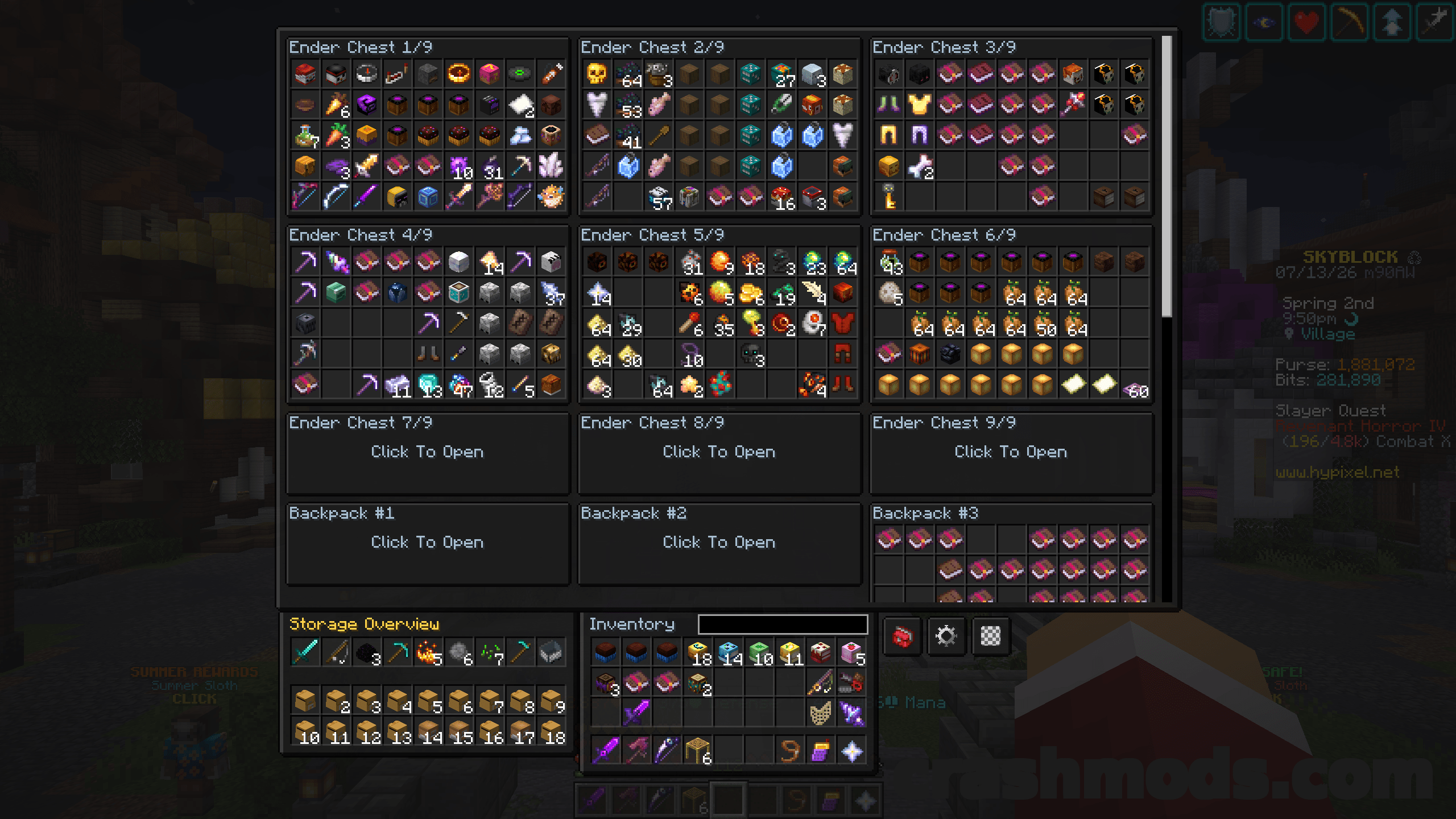
  • One overlay replaces the vanilla chest screen for SkyBlock storage
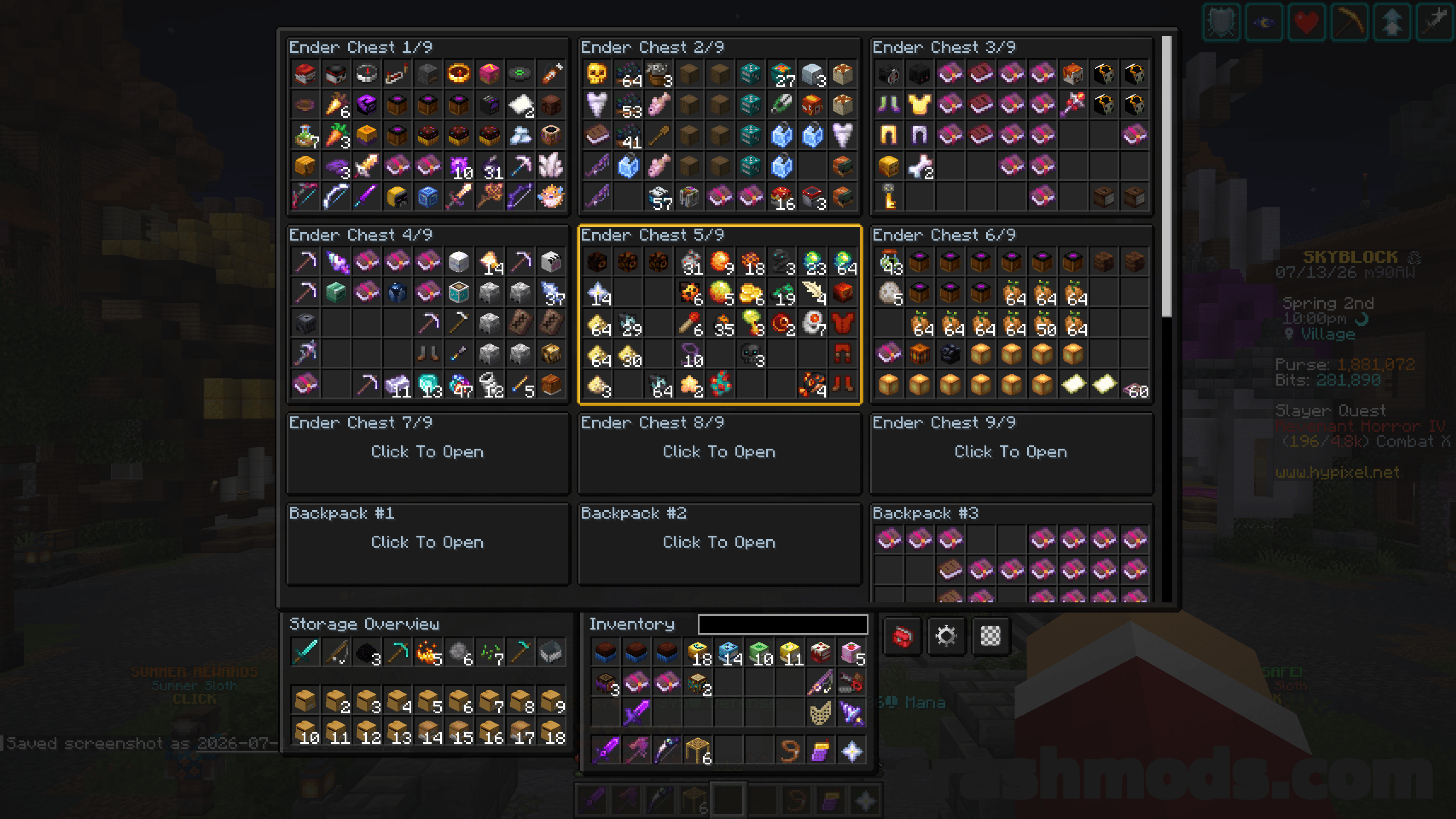
  • All 9 Ender Chest pages visible in a single view
  • Up to 18 Backpack pages shown in the same overview
  • Rift Storage pages handled by the same interface
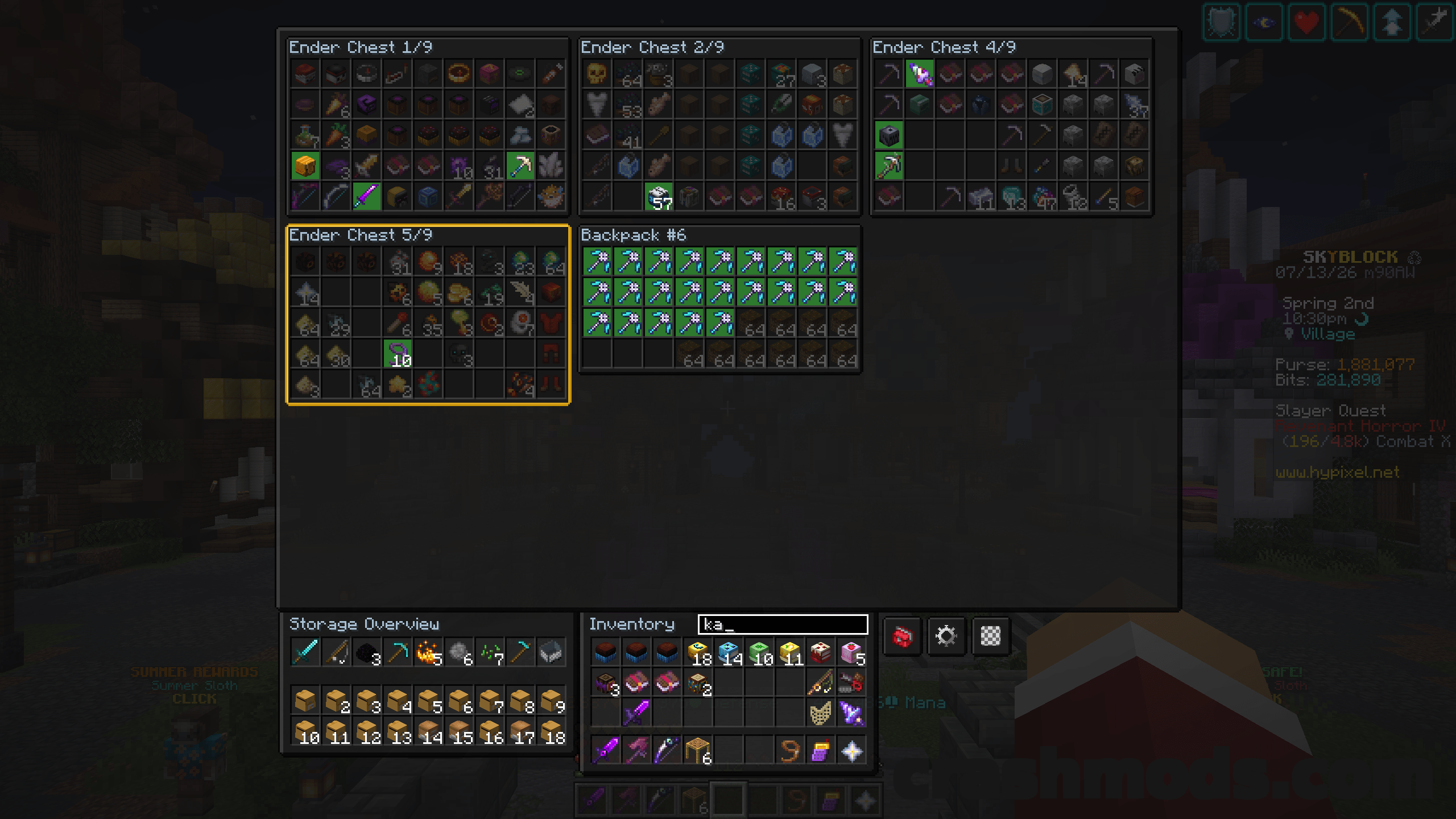
  • Search bar filters items across all pages simultaneously
  • Right-click a page card to give it a custom name and sort position
  • Custom names and ordering are remembered per SkyBlock profile
  • Quick buttons for settings, theme and the Hunting or Farming Toolkit, each hideable
  • Transparent, dark and light overlay themes cycled on the fly
  • Layout and scroll options for cards per row, spacing, margins, scroll speed and auto-scroll
  • Requires Fabric API and UI Lib, with MidnightLib bundled in
  • Fabric support for Minecraft 1.21.1

Hypixel SkyBlock storage is spread across a stack of separate pages, and finding one item usually means clicking through every single one of them. Enhanced Storage replaces the vanilla chest screen with a single overlay that lays out all nine Ender Chest pages, up to eighteen Backpack pages, or your Rift Storage at once, so nothing has to be memorized any more.

A search bar filters items across all pages simultaneously, so a pet, an armor piece or a crafting material turns up in seconds instead of a page-by-page hunt. Page cards can be renamed and reordered from a right-click edit dialog, letting the pages you use most sit exactly where you want them, and both the names and the sort order are stored per SkyBlock profile.

One-click buttons open the config, cycle between transparent, dark and light overlay themes, and jump to the Hunting or Farming Toolkit, and any of them can be hidden if you do not use it. Settings are edited in-game with live saving and cover layout details such as cards per row, spacing and margins, along with scroll speed, auto-scrolling to the currently open page, cursor position saving and whether the search and scroll state carries over between visits.

✅ Description reviewed by the CrashMods Team

Changelog

V9.7.0 — First release.
Frequently asked questions6 questions

Skyblock Enhanced Storage – which game and version is it for?

This mod was made for Minecraft (game version: 1.21.1). The mod's own version: V9.7.0. After a major game update, older mods may stop working — check the version before installing.

Skyblock Enhanced Storage – how do I install it?

Install the mod loader that matches the mod's Minecraft version (Forge or Fabric), then put the .jar file in the .minecraft/mods folder.

Is the download safe?

We checked the file with VirusTotal: none of the 65 antivirus engines flagged it. The full report opens from the "Verified" badge on the mod's page.

How big is the download?

The mod's file size is about 207.4 KB.

Skyblock Enhanced Storage – who made it?

The mod's original creator: Kd_Gaming1.

Is the mod free?

Yes, downloading from CrashMods is free; registration is not required.

Download Get the latest version of this mod and enjoy!

Mod version: V9.7.0 Minecraft 1.21.1 2 months ago 207.4 KB
Skyblock Enhanced Storage – Unified Searchable Overlay for Ender Chests and Backpacks V9.7.0 207.4 KB Minecraft Download File

The file is on ModsDrop, our own storage.

  • Scannedwith VirusTotal
  • EU serversFast & reliable
  • Free downloadNo registration needed
  • Latest versionAlways up to date

More Minecraft Storage mods

Uploaded by

RavenByte73
  • 2,820 mod
  • 1 follower
  • 6,108 download
  • Registered 4 months ago

Community screenshots

Screenshots from players using this mod. Add yours — images only (JPG, PNG, WebP).

No community screenshots yet — be the first!

Leave a comment