Skip to content
Join our Discord for updates & support Discord

Home / Games / Minecraft

Minecraft 1.21.9 mods

7 mods

Mods made for Minecraft 1.21.9 — every file is virus-scanned and free to download. Filter by category or sort by downloads below.

Browse trending picks and fresh uploads for Minecraft—the grid below jumps straight into the catalog.

Filters
Active filters: 1.21.9 Clear all
Animatium – Legacy 1.7 and 1.8 Animations Minecraft mod screenshot

Animatium brings the classic 1.7 and 1.8 era animations and mechanics back to modern Minecraft versions, with toggleable features and server control.

  • Legacy Animations
  • 1.7 Era
  • 1.8 Era
  • Nostalgia
  • Old Sneak Height
  • Miss Penalty
  • Hitbox Inflation
  • Fishing Rod Bobber
  • Entity Movement
  • Server Features
  • YACL
  • Configurable
  • Fabric
  • 1.21.9

RavenByte73 by RavenByte73 Rank:LITETOP

Minecraft Cursed · Mod version: V9.9.0 · Version: 1.21.9

View Mod
Updated 2mo ago Views 68 Downloads 9 Likes 0 Dislikes 0 Comments 0
File Size: 1,011.3 KB
The Immersive Music Mod – Biome and Structure Based Soundtrack Minecraft mod screenshot

The Immersive Music Mod adds 147 new songs to Minecraft that play based on the biome and structure you are in, composed in a style mixing C418 and newer composers. Fabric mod for 1.21.9 with handy music commands.

  • Music Mod
  • 147 Songs
  • Biome Music
  • Structure Music
  • Soundtrack
  • Ambient
  • Immersion
  • Music Commands
  • Song Delay
  • Configurable
  • Terralith Compatible
  • Singleplayer
  • Fabric
  • 1.21.9

RavenByte73 by RavenByte73 Rank:LITETOP

Minecraft Adventure · Mod version: V9.6.3 · Version: 1.21.9

View Mod
Updated 2mo ago Views 29 Downloads 1 Likes 0 Dislikes 0 Comments 0
File Size: 148.1 MB
Eternal Nether – New Nether Structures, Mobs and Gear Minecraft mod screenshot

Eternal Nether expands the Minecraft Nether with the Piglin Manor, Citadel and Catacombs structures, new hostile mobs, a Cutlass, a Netherite Shield and withered building blocks.

  • Nether
  • New Mobs
  • Structures
  • Piglin Manor
  • Citadel
  • Catacombs
  • Warped Endermen
  • Piglin Hunter
  • Cutlass
  • Netherite Shield
  • Withered Blocks
  • Music Disc
  • NeoForge
  • 1.21.9

RavenByte73 by RavenByte73 Rank:LITETOP

Minecraft Mobs · Mod version: V9.3.4 · Version: 1.21.9

View Mod
Updated 2mo ago Views 11 Downloads 0 Likes 0 Dislikes 0 Comments 0
File Size: 7.0 MB
SkyBlock Advancements – Guided Progression for Skyblock Worlds Minecraft mod screenshot

A Minecraft data pack that rearranges and rewrites the story and nether advancements to guide skyblock progression, adding extra advancements with hints for cobblestone generators, water, grass and lava.

  • Data Pack
  • Advancements
  • SkyBlock
  • Progression
  • Story Tab
  • Nether Tab
  • Guided Hints
  • Cobblestone Generator
  • Lava Source
  • Fabric
  • Forge
  • NeoForge
  • Quilt
  • 1.21.9

RavenByte73 by RavenByte73 Rank:LITETOP

Minecraft Adventure · Mod version: V9.8.1 · Version: 1.21.9

View Mod
Updated 2mo ago Views 6 Downloads 1 Likes 0 Dislikes 0 Comments 0
File Size: 549.6 KB
Respawning Animals – Bedrock-Style Animal Spawning and Despawning Minecraft mod screenshot

Respawning Animals brings Bedrock Edition style animal spawning to Minecraft Java Edition: wild animals despawn when far away and repopulate around players, while tamed, bred and named animals stay safe.

  • Mob Spawning
  • Passive Mobs
  • Animal Respawn
  • Bedrock Parity
  • Despawning
  • Wildlife
  • Tamed Animals
  • Farming
  • Game Rules
  • Server Required
  • Puzzles Lib
  • NeoForge
  • 1.21.9
  • Multiplayer Ready

RavenByte73 by RavenByte73 Rank:LITETOP

Minecraft Mobs · Mod version: V9.7.2 · Version: 1.21.9

View Mod
Updated 2mo ago Views 10 Downloads 0 Likes 0 Dislikes 0 Comments 0
File Size: 42.9 KB
Lucky Blocks – Modern Style Lucky Blocks Minecraft mod screenshot

Lucky Blocks brings modern, minigame-inspired lucky blocks to Minecraft on Fabric. It works server-side only, so players can join servers with lucky blocks without installing the mod.

  • Lucky Blocks
  • Modern Style
  • Minigame
  • Random Rewards
  • Server-Side
  • No Client Needed
  • Multiplayer Ready
  • Survival
  • Fun
  • Surprise Loot
  • Magic
  • Lightweight
  • Fabric
  • 1.21.9

RavenByte73 by RavenByte73 Rank:LITETOP

Minecraft Magic · Mod version: V9.5.3 · Version: 1.21.9

View Mod
Updated 2mo ago Views 3 Downloads 0 Likes 0 Dislikes 0 Comments 0
File Size: 85.0 KB
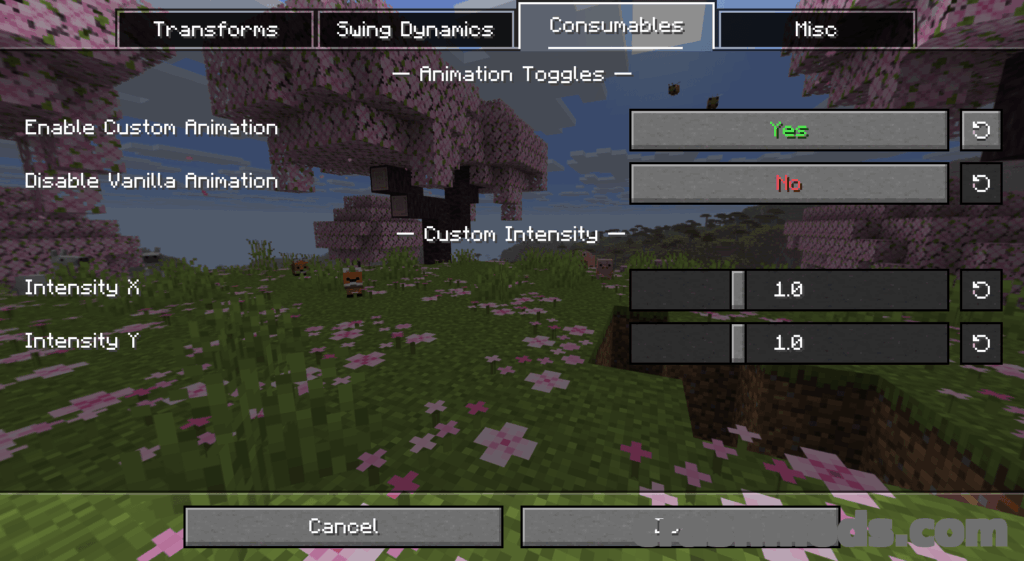
View Model – Customize First-Person Hand Positions Minecraft mod screenshot

View Model lets you change the position and size of your first-person hands in Minecraft through a slider-based menu opened with the V key.

  • View Model
  • Hand Position
  • First Person
  • Transforms
  • Swing Settings
  • Consumables
  • Sliders
  • Keybind Menu
  • Mod Menu
  • MidnightLib
  • Configurable
  • Visual Tweak
  • Fabric
  • 1.21.9

RavenByte73 by RavenByte73 Rank:LITETOP

Minecraft Adventure · Mod version: V9.4.3 · Version: 1.21.9

View Mod
Updated 2mo ago Views 74 Downloads 4 Likes 0 Dislikes 0 Comments 0
File Size: 319.2 KB

Minecraft Mods and Community Downloads

Browse free Minecraft mods, community downloads and add-ons on CrashMods. This archive helps players discover new content, compare mod pages and find updated releases faster.

  • Explore fresh and popular Minecraft mods in one place.
  • Use categories and sorting tools to find the right download.
  • Check screenshots, descriptions and file information before downloading.

CrashMods is built for players who want a simple way to discover, browse and download community-made game mods.

Minecraft mods — vetting, installing, common questions

🛡️ How we vet the files

845 of the 845 Minecraft mods carry a finished clean VirusTotal verdict (100%).

  • Until the check finishes the upload stays hidden: nobody but you and the team can reach it.
  • The download button names the host before you leave the site — and one click reports anything that looks wrong.

💾 Installing a Minecraft mod

Minecraft mods need a mod loader, and the .jar files go into .minecraft\mods.

  1. Install Fabric or NeoForge for the Minecraft version the mod lists.
  2. Run the loader profile once from the Minecraft Launcher.
  3. Put the .jar into .minecraft\mods (do not unzip it), plus any required library such as Fabric API.
  4. Start the game with the loader profile selected.

Full Minecraft installation guide →

❓ Frequently asked questions

Are the Minecraft mods on CrashMods safe?

Uploaded files up to 650 MB are scanned with VirusTotal automatically BEFORE the mod goes public. Minecraft currently has 845 mods: 845 carry a finished clean verdict. The result is shown on each card, and you can report any mod that looks wrong.

How do I install a Minecraft mod?

Minecraft mods need a mod loader, and the .jar files go into .minecraft\mods. 1) Install Fabric or NeoForge for the Minecraft version the mod lists. 2) Run the loader profile once from the Minecraft Launcher. 3) Put the .jar into .minecraft\mods (do not unzip it), plus any required library such as Fabric API. 4) Start the game with the loader profile selected.

Are these mods free?

They are free to download — there is no paywall on the Minecraft catalogue and no sign-up required. A mod is only paid if its creator set a price, and that price is stated plainly on the card and the mod page.

How do I know which game version a mod fits?

Every Minecraft mod card states the game version it was built for, and the sidebar lets you filter by version. After a game update, filter to the newest version first.