Skip to content
Join our Discord for updates & support Discord

Pellet Hall Auto Stacker – Automatic Pallet Stacking Script V1.0

—/5, 0 ratings

Your rating

Creator: Bgnak05

File verified — safe
All 75 security engines found this file clean.
Last checked: 2026-11-10
Security report

Features:

  • Requires Straw Harvest add-on (Pellet Hall) to function
  • Moves finished pallets from the output belt into the hall's storage bays
  • Stacks pallets two high in the storage bays
  • Keeps the production line running by preventing the belt from filling up
  • Works only on the Pellet Hall; no other vehicles or placeables are affected
  • Uses a global listener so it cannot interfere with other script mods
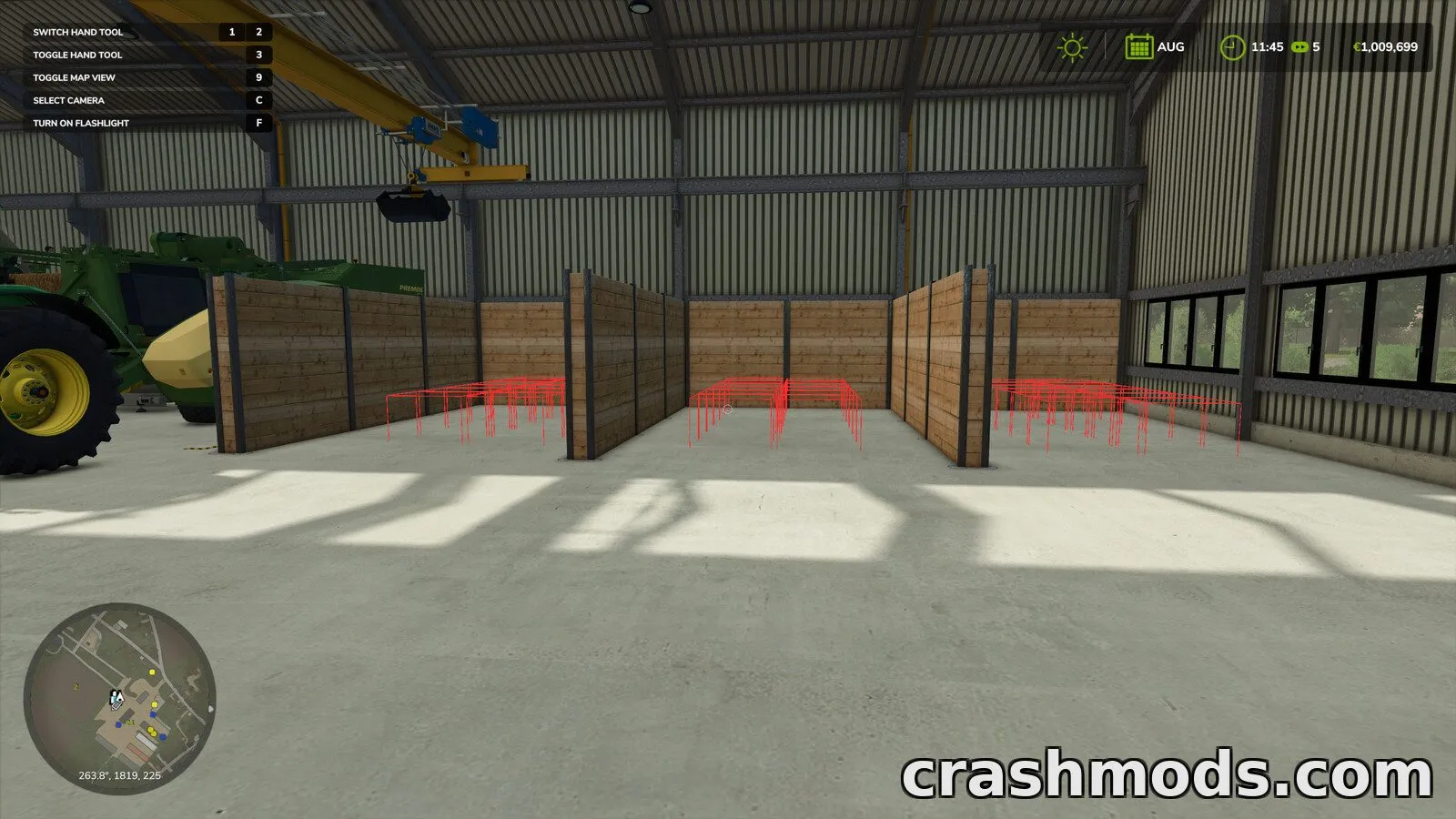
  • Stacking positions follow the hall's own local coordinates, working wherever it is placed
  • Retries pallet placement if the first attempt fails, then stops cleanly if it can't
  • Straightens out misaligned pallets once per session after physics settles
  • Settings can be adjusted through an XML file: bay positions, grid size, stacking order, timings
  • Optional on-screen calibration boxes for different hall placements
  • Single player only; adds no new buildings, models or textures

Pellet Hall Auto Stacker is a script mod built specifically for the Pellet Hall from the Straw Harvest add-on. It needs that add-on installed to do anything at all, since it only watches and manages that one building.

In play, the mod takes over the tedious job of clearing the Pellet Hall's output belt. As soon as pallets are released, it moves them into the hall's storage bays and stacks them two high, stopping the frequent production halts that happen once the three output slots fill up. It also tidies up any pallets that ended up out of place once per session.

This is a good fit for players running the Straw Harvest Pellet Hall who want it to keep producing without constantly checking on it. It stays out of the way of every other mod and vehicle, touching nothing beyond the hall itself, and its behavior can be fine-tuned through an optional settings file.

✅ Description reviewed by the CrashMods Team

Changelog

V1.0 — First release.
Frequently asked questions6 questions

Pellet Hall Auto Stacker – which game and version is it for?

This mod was made for Farming Simulator 25 (game version: 1.25.x). The mod's own version: V1.0. After a major game update, older mods may stop working — check the version before installing.

Pellet Hall Auto Stacker – how do I install it?

Copy the .zip file to the Documents/My Games/FarmingSimulator2025/mods folder, then enable it in the in-game mod list.

Detailed guide

Is the download safe?

We checked the file with VirusTotal: none of the 75 antivirus engines flagged it. The full report opens from the "Verified" badge on the mod's page.

How big is the download?

The mod's file size is about 87.2 KB.

Pellet Hall Auto Stacker – who made it?

The mod's original creator: Bgnak05.

Is the mod free?

Yes, downloading from CrashMods is free; registration is not required.

What’s inside the package?3 files · 168.9 KB unpackedScripts & code 1Textures 1Config & text 1Show filesHide files

Folders, file names and sizes, read from the downloadable archive.

Scripts & code — names only, these files cannot be opened: PelletHallStacker.lua

Package
  • PelletHallStacker.lua32.6 KB
  • icon_PelletHallStacker.dds128.1 KB
  • modDesc.xml8.2 KB
1–4 / 4

Download Get the latest version of this mod and enjoy!

Latest Mod version: V1.0 Farming Simulator 25 1.25.x just now 87.2 KB
Pellet Hall Auto Stacker – Automatic Pallet Stacking Script V1.0 87.2 KB Farming Simulator 25 Download File

The file is on ModsDrop, our own storage.

  • Scannedwith VirusTotal
  • EU serversFast & reliable
  • Free downloadNo registration needed
  • Latest versionAlways up to date

More Farming Simulator 25 Scripts and Tools mods

Uploaded by

Kiro_8036
Kiro_8036 LITE
  • 805 mod
  • 0 follower
  • 1,715 download
  • Registered 2 months ago

Community screenshots

Screenshots from players using this mod. Add yours — images only (JPG, PNG, WebP).

No community screenshots yet — be the first!

Leave a comment