

Furniture and decoration mods cover a wide range in Minecraft: some add physical objects like paintings or patterned beds, others change how the interface looks, and a few mess with the sky itself. What they share is a focus on how the game feels to look at, rather than new mechanics to grind through. A single mod from this list can shift a build from plain to lived-in, or make menus feel less abrupt.
When picking from a group like this, check the mod loader first, since Fabric and NeoForge builds are not interchangeable, and confirm the Minecraft version matches your instance. Several of these also lean on a dependency such as an API mod or a config library, so read the requirements before you drop a file into your mods folder and expect it to load.
1. Real Camera

Real Camera ties the first-person view to a chosen point on your player body, so you actually see your own model instead of an empty void where your arms should be. It comes with a model view screen for picking faces and layers, plus a preview section for checking forward, upward and target vectors before you commit to a setup.
F6 toggles it on the fly, with extra hotkeys for fine adjustments, and saved configs let you switch setups by priority. It needs Fabric API, and Cloth Config API is recommended if you want the config screen rather than editing files by hand.
Download Real Camera – Realistic First-Person View with Visible Player Model on CrashMods · Game version: 1.21.1
2. TAB

TAB is built for server operators who want control over the tablist, nametags, scoreboard and bossbar rather than for a single player’s world. It handles custom headers and footers, nametag styling, tablist sorting, placeholders with conditional variants, and RGB color throughout.
It runs on server software like Bukkit, Spigot, Paper, Purpur, Folia, BungeeCord, Velocity and Waterfall, and exposes an API so other plugins can build on top of it. Worth a look if your server needs a cleaner, more informative player display rather than vanilla defaults.
Download TAB – All-in-One Tablist, Nametag and Scoreboard Display on CrashMods · Game version: 1.16.5
3. Create Aeronautics: Encased Fluid Pipes
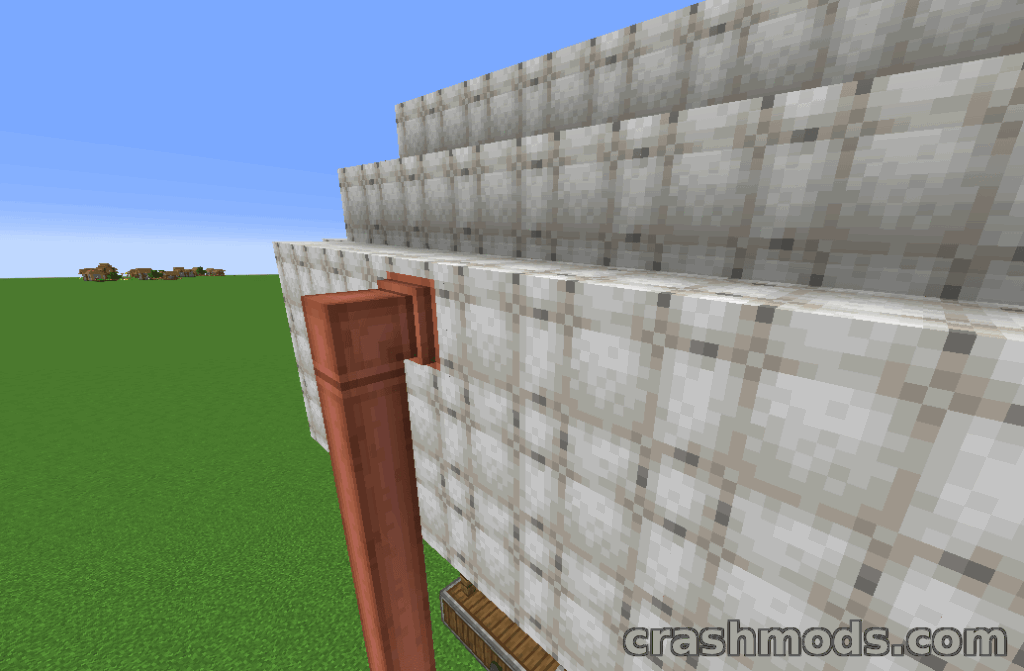
This is a focused add-on for Create Aeronautics that wraps fluid pipes in the same envelope material used on the airship hull blocks, matching all sixteen dye colors. The casing counts toward airtight balloon volume, so it keeps your hot air sealed while still looking like part of the envelope.
Right-click with dye to recolor in place, or sneak and wrench to strip the casing back into your inventory. It needs both Create and Create Aeronautics installed, runs on NeoForge, and is really only relevant if you are already building airships with that mod.
Download Create Aeronautics: Encased Fluid Pipes – Envelope-Wrapped Pipes for Airships on CrashMods · Game version: 1.21.7
4. Sun and Moon Celestial Configuration

This one does a single thing: it lets you resize the sun and moon in the sky through config values. Height and width are separate for each body, so you can stretch a sun into an oval or shrink the moon down without touching the other.
Defaults keep everything matching vanilla, so nothing changes until you open the config and start adjusting. It’s purely visual, with no gameplay effect, and runs on NeoForge.
Download Sun and Moon Celestial Configuration – Resize the Sun and Moon in Your Sky on CrashMods · Game version: 1.21.1
5. Diagonal Windows

Diagonal Windows lets every type of glass pane and iron bar connect diagonally instead of only in straight lines, which opens up a lot more options for angled walls and greenhouse-style builds. It picks up blocks added by other mods automatically, and a block tag lets you exclude anything you don’t want included.
It’s part of a small family alongside Diagonal Fences and Diagonal Walls, and needs to be installed on both client and server to work. On Fabric it also requires Puzzles Lib, Fabric API and Forge Config API Port, so check those are in place before you load a world.
Download Diagonal Windows – Glass Panes and Iron Bars That Connect Diagonally on CrashMods · Game version: 1.19.2
6. Smooth Gui
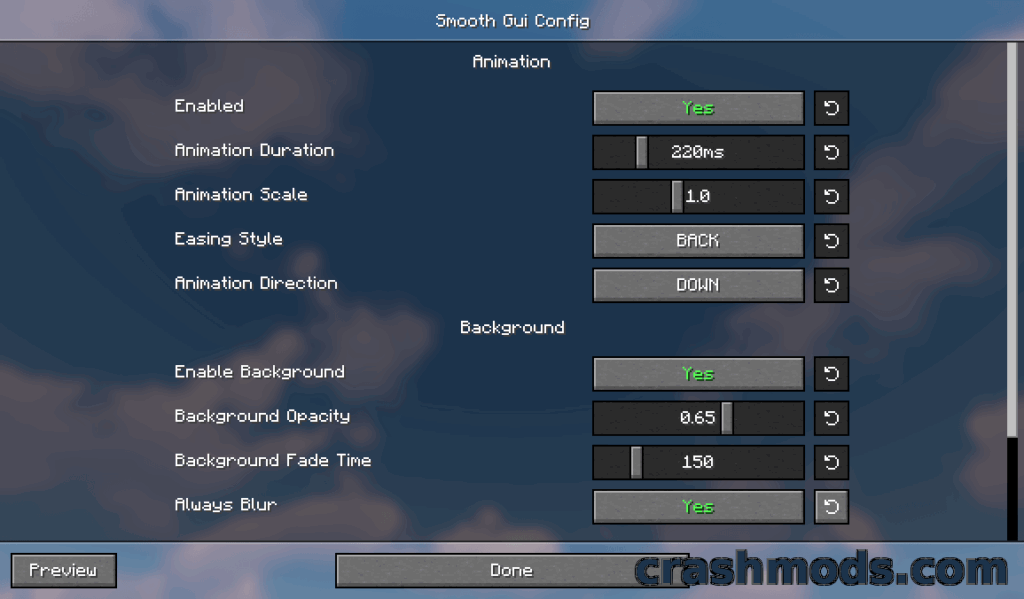
Smooth Gui replaces the usual instant snap of opening an inventory or menu with a slide-in animation, paired with a fade-in on the background overlay and blur. It’s a small touch, but it changes how abrupt switching screens feels.
The animation speed and style can be tuned in the config, so you can keep it subtle or make it more noticeable. It’s lightweight and runs on NeoForge, making it an easy addition to a pack built around a cleaner interface.
Download Smooth Gui – Slide-In and Fade Animations for Menus on CrashMods · Game version: 26.1.2
7. Bedspreads

Bedspreads puts banner patterns onto beds, the same way you’d apply a pattern to a shield. Craft a bed together with the banner carrying the design you want, and the pattern spreads across the whole bed, with the banner’s color taking priority over the bed’s own color.
You can separate a decorated bed back into its parts later, and crafting one on its own returns the original banner. It’s a tiny download, runs on Fabric, and was previously known as Cosmetic Beds if you’re trying to match it up with older references.
Download Bedspreads – Banner Patterns for Your Beds on CrashMods · Game version: 1.17.1
8. Blur+

Blur+ swaps the flat, static blur behind Minecraft’s menus for an animated Gaussian blur shader, with a fade-in when a screen opens. Blur strength, fade timing and the gradient overlay colors are all set in a config file, with colors given as ARGB hex values.
There’s an exclusion list for screens you want to keep sharp, with chat left out by default. It runs on NeoForge, so it suits anyone who finds the vanilla menu backdrop too plain or too distracting.
Download Blur+ – Animated Gaussian Blur for GUI Backgrounds on CrashMods · Game version: 26.2
9. Spyglass Astronomy

Spyglass Astronomy generates a full solar system for each world, adding improved stars, planets and comets that every player on that world sees the same way. The spyglass gets three modes you cycle through with middle click, including one for drawing your own constellations by dragging between stars.
You can name stars, planets and constellations with client-side commands, pull up details with an info command, and share constellation codes with others on a multiplayer server. It’s entirely client-side, needs Fabric API, and plays nicely with Cosmos star rendering if you run both.
Download Spyglass Astronomy – Draw Constellations and Explore Planets on CrashMods · Game version: 26.2
10. Medieval Paintings

Medieval Paintings adds more than fifty new paintings drawn in a medieval fantasy style, all at a 16×16 resolution so they sit comfortably next to vanilla art rather than clashing with it. They’re placed exactly like any normal painting, so there’s nothing new to learn there.
A matching resource pack swaps out the vanilla paintings if you want the whole set replaced instead of just added to. It’s aimed squarely at builders who want more wall decoration options, and it runs on NeoForge.
Download Medieval Paintings – 50+ Vanilla Friendly Medieval Fantasy Paintings on CrashMods · Game version: 1.21.1
Tips for furniture and decorations mods in Minecraft
- Match the mod’s listed Minecraft version and mod loader (Fabric, Forge or NeoForge) to your own setup before installing, since they are not interchangeable.
- Install any required dependency, such as an API or config library, before the mod itself, or it may fail to load at all.
- Back up your world save before adding anything that changes world generation or sky rendering, so you can roll back if something looks wrong.
- Check each mod’s config file after first launch, since many of these are tuned through config values rather than in-game menus.
- If you run a server, confirm whether a mod needs installing on both client and server or just one side, since mismatches can stop players from connecting.
Browse all Minecraft mods on CrashMods
