
File verified — safe
All 73 security engines found this file clean.
Features:
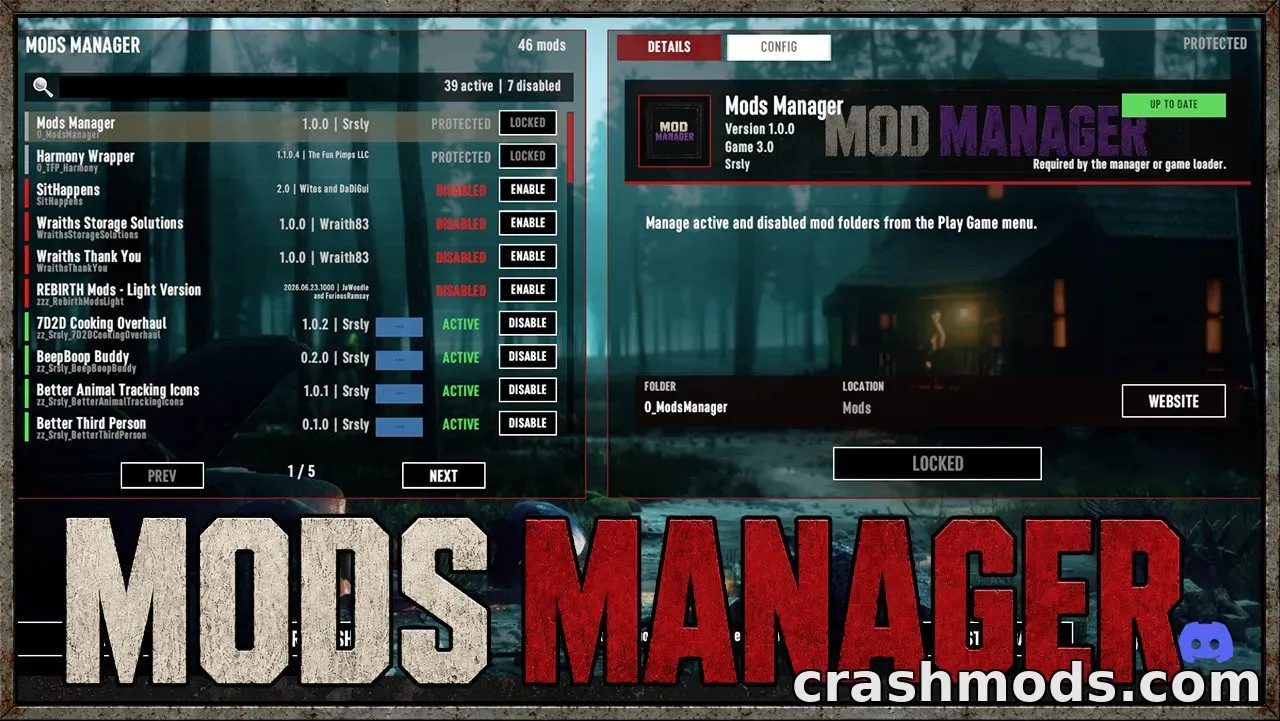
- Adds a Mods Manager button to the main menu
- Shows active mods from the Mods folder and disabled mods from ModsDisabled
- Lets you enable or disable mods directly from the menu
- Displays custom icons and banners when a mod provides ModInfo.xml
- Shows mod name, description, author, version, game version and website
- Shows update notices when a mod includes an UpdateManifest
- Compares mod version and game version to flag mismatches
- Allows in-game editing of supported mod configs
- Supports key/value and XML config formats
- Creates an automatic backup before the first config edit
- Supports marking required or protected mods to prevent accidental disabling
Mods Manager adds a dedicated management screen to the main menu of 7 Days to Die, so players can see every installed mod without opening file folders.
From this screen you can enable or disable mods, read details like author and version, get notified about available updates, and tweak supported config settings directly in-game. Config changes are automatically backed up before the first edit, and mods can be flagged as protected so important loader or manager files aren’t disabled by mistake.
It’s built for players who run several mods at once and want a simple way to toggle them, check compatibility, and adjust settings without digging through install directories every time something changes.