

Adventure mods in Minecraft cover a wide range of ground: some add new things to fight or drive, some fill empty biomes with structures to find, and others just change how the game looks and feels while you play. The ten mods below touch combat, exploration, crafting, music and a few quality-of-life tweaks, so there is a mix here rather than one single theme.
When picking mods, check the loader first, since Fabric, Forge and NeoForge are not interchangeable, and make sure the game version on the mod page matches your install. Also look at the listed dependencies before downloading, because several of these mods only work once another library or mod is in place.
1. Superb Warfare – Modern Guns Artillery and Drivable War Vehicles
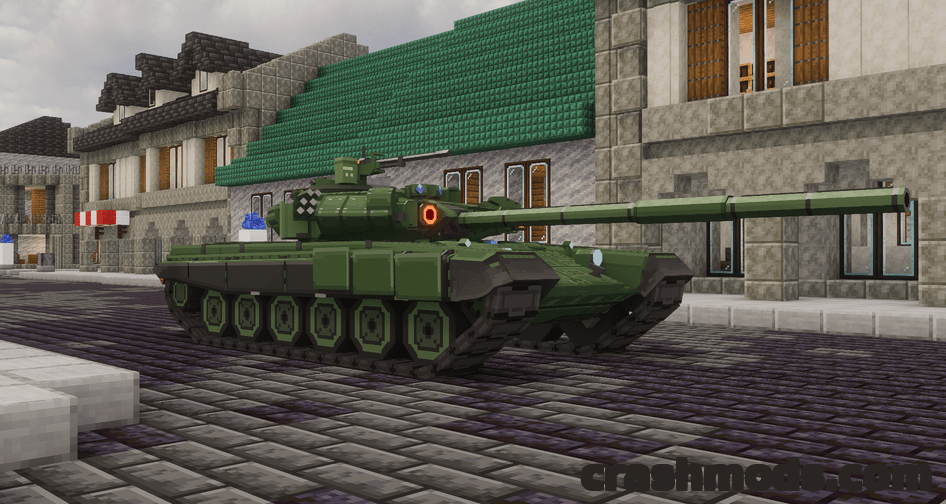
Superb Warfare builds a full combat arsenal around guns, large cannons and drivable war vehicles, including tanks and helicopters. Weapons range from rocket launchers up to an energy cannon, and each gun has its own reload and aim animations. A gun perk system lets you tune damage and fire rate, and explosion-based block destruction can be turned off through the config if you want to keep builds intact.
It needs GeckoLib and the Curios API to run, and it is built for NeoForge on Minecraft 1.21.1, so check those pieces are in your mods folder before anything else.
Download Superb Warfare – Modern Guns Artillery and Drivable War Vehicles on CrashMods · Game version: 1.21.1
2. TMCraft – Craftable TMs and Move Items for Cobblemon

TMCraft gives Cobblemon players a crafting path to TMs instead of relying only on what you find or buy. Blank discs come in copper, iron, gold, diamond and netherite tiers, with a smithing template to push a disc up a tier, and separate items cover TM, egg, tutor and even star moves that a Pokémon could not normally learn.
Move Tutor and Pokémon Breeder villagers also sell move items, and a game rule decides whether items get consumed on use. It runs on Fabric for Minecraft 1.21.1 and obviously needs Cobblemon installed to matter.
Download TMCraft – Craftable TMs and Move Items for Cobblemon on CrashMods · Game version: 1.21.1
3. View Model – Customize First-Person Hand Positions
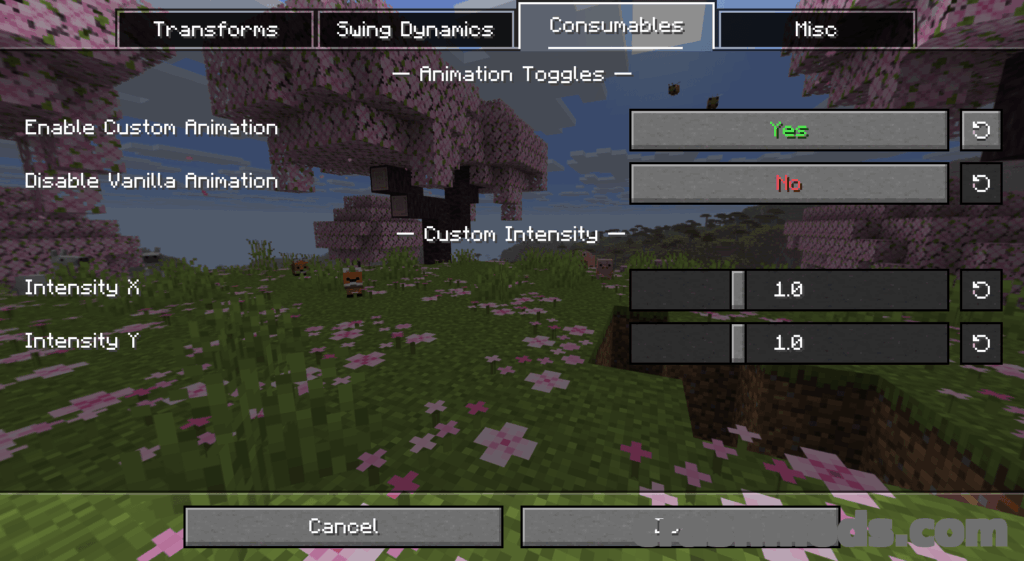
View Model hands you control over something vanilla never lets you touch: the position and size of your hands and held items in first person. Pressing V opens a menu with sliders and toggles split across Transforms, Swing Settings, Consumables and Misc pages, so you can nudge things until the view sits right for you.
It also plugs into Mod Menu for easier access to its settings. It requires MidnightLib and runs on Fabric for Minecraft 1.21.9.
Download View Model – Customize First-Person Hand Positions on CrashMods · Game version: 1.21.9
4. The Immersive Music Mod – Biome and Structure Based Soundtrack
This mod swaps vanilla’s limited music rotation for 147 original songs that change based on the biome and structure you are standing in, with a style the author points to C418 and later composers for inspiration. Commands let you skip or stop a track, check what is playing, and open a config menu to adjust how often songs trigger.
It is built to sit alongside biome mods like Terralith, Nature’s Spirit and Biomes O’ Plenty rather than fight with them. Fabric only, for Minecraft 1.21.9.
Download The Immersive Music Mod – Biome and Structure Based Soundtrack on CrashMods · Game version: 1.21.9
5. Default Skill Trees – Combat and Mining Skill Trees

Default Skill Trees gives Pufferfish’s Skills a ready-made progression path instead of leaving you to build one from scratch. One tree gains experience from killing mobs and improves combat ability, while the other grows from mining stone and ores, with points spent on each tree unlocking different benefits.
It is shipped as a mod for easier installation even though it is really a data pack, and it needs both Pufferfish’s Skills and Pufferfish’s Attributes to function. It covers Fabric, Forge and NeoForge for Minecraft 1.21.8.
Download Default Skill Trees – Combat and Mining Skill Trees on CrashMods · Game version: 1.21.8
6. FirstAid – Body Part Health System with Bandages and Morphine
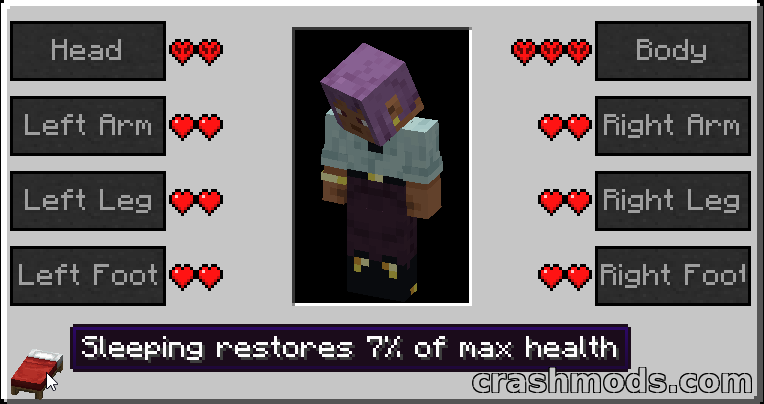
FirstAid tears out the single vanilla health bar and replaces it with eight separate regions for head, body, legs and feet. Losing all health in the head or body kills you outright, damaged feet bring on a constant slowness, and serious head injuries can cause blindness or nausea. Bandages and plaster target specific body parts through a right-click healing menu, and morphine temporarily suppresses all of these debuffs.
Armor only protects the body part it is actually covering, with helmets scaled up to compensate, and vanilla regeneration is disabled by default but configurable. It runs on Forge for Minecraft 1.12.2.
Download FirstAid – Body Part Health System with Bandages and Morphine on CrashMods · Game version: 1.12.2
7. Trek – Over 150 Vanilla-Friendly Structures for Explorers and Builders

Trek scatters more than 150 custom structures across the biomes, from large builds like flying and water islands to pyramids, fortresses, mansions, camps, ships and small ruins. Placement leans on the biome, so you will find things like jungle treehouses or taiga snowmen in context rather than randomly, and weighted spawning keeps rarer finds like sunken cities genuinely uncommon.
It is a data pack at heart, so it does not need a mod loader to work, though it also covers Fabric, Forge, NeoForge and Quilt if you prefer running it as a mod. It targets Minecraft 1.21.1.
Download Trek – Over 150 Vanilla-Friendly Structures for Explorers and Builders on CrashMods · Game version: 26.2
8. X-Ray World Generation – Ores-Only Void World Datapack

This one is not a texture pack or cheat tool, it is a world generation data pack that strips out normal terrain entirely and leaves only ores and the outer shells of structures floating in air. Diamonds and other ores become easy to spot since there is nothing else around them, though you may also spawn sitting on a floating vein.
It only applies to a freshly created world and will not work with superflat, amplified, biome mods or most terrain mods. It supports Fabric, Forge, NeoForge and Quilt for Minecraft 1.21.6.
Download X-Ray World Generation – Ores-Only Void World Datapack on CrashMods · Game version: 1.21.6
9. Fancy Toasts – Animated Advancement Toasts with Custom Textures

Fancy Toasts takes the plain advancement pop-up Minecraft has used for years and gives it eight built-in texture sets, from a vanilla look to neon, plus four animation styles ranging from standard to quirky. Tasks, goals and challenges each get their own banners, icons and sounds, and a customization screen with search and per-option info makes tweaking things straightforward.
You can load your own hand-drawn textures and bundle them into a modpack to share, and it still recognizes advancements added by other mods and data packs. It runs on NeoForge for Minecraft 1.21.1.
Download Fancy Toasts – Animated Advancement Toasts with Custom Textures on CrashMods · Game version: 26.2
10. Trimmable Tools – Smithing Trim Patterns for Your Tools
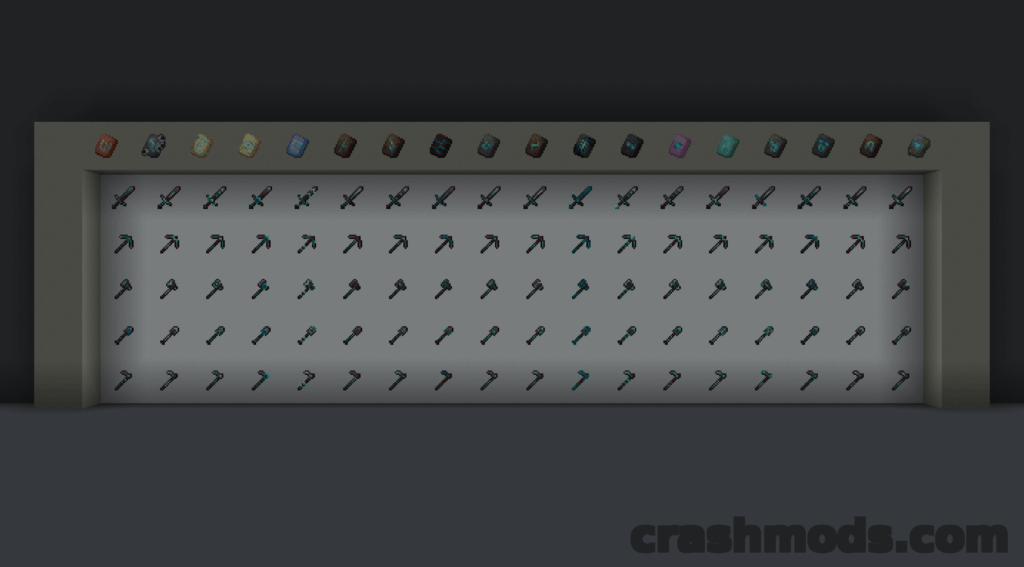
Trimmable Tools takes the armor trim system already in the game and extends it to tools, using the same smithing templates to apply decorative patterns. Each template brings its own set of patterns, with up to 18 per tool and 5400 total combinations across tools, patterns and trim materials, so there is plenty of room to make a kit look distinct.
It is compatible with resource packs that retexture tools, and it comes as both a mod and a data pack. Built for NeoForge on Minecraft 1.21.1.
Download Trimmable Tools – Smithing Trim Patterns for Your Tools on CrashMods · Game version: 1.21.1
Tips for adventure mods in Minecraft
- Match the mod loader and Minecraft version exactly to what the mod page states before downloading, since Fabric, Forge and NeoForge builds are not interchangeable.
- Install any listed dependencies, such as library mods or APIs, before the main mod or it may fail to load.
- Back up your world save before adding mods that change world generation, health systems or other core mechanics, in case you want to roll back.
- Add mods one at a time when you can, so if something breaks or conflicts you know which one caused it.
- Check mod configuration files or in-game menus after installing, since many of these mods let you adjust or disable specific features to fit your world.
Browse all Minecraft mods on CrashMods
