

Scripts and tools mods don’t add new machines, they change how the game behaves around the machines you already have. That covers everything from how crops move off a combine, to how paint jobs look, to what shows up on your dashboard or in the settings menu. None of them touch the map or the vehicle roster directly, which is exactly why they tend to stick around and keep working across different setups.
When picking from a list like this, think about what actually slows you down during a normal session. A small script that automates one repetitive task, like transferring crop to a silo or leasing a production site, usually pays off more than a flashy feature you’ll use once. Check file size and install notes too: most of these are tiny, single-purpose scripts, so there’s rarely a reason to skip reading what each one actually toggles before you put it in your mods folder.
1. Manual Paint – Per-Material Vehicle Repaint Tool
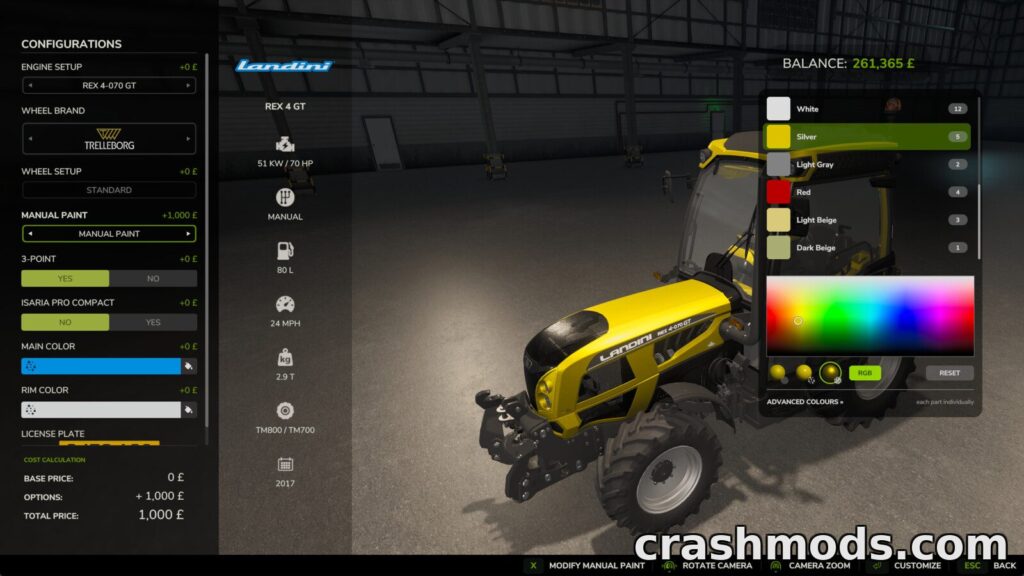
This one goes past the handful of colour slots a vehicle maker normally gives you and lets you paint every paintable material on the machine, whether you’re buying, leasing, or just restyling something you already own from the workshop. You can recolour a whole shade across every part that uses it in one go, or switch to a per-part view and handle each material separately, and any colour can be paired with a glossy, metallic or matte finish.
Glass, rubber, lights and chrome get detected and left alone automatically, so you’re not accidentally painting your headlights. There’s a flat fee for applying paint, but that charging can be switched off in the settings if you just want free repaints, and the results carry over through saving, selling and multiplayer.
Download Manual Paint – Per-Material Vehicle Repaint Tool on CrashMods
2. Non-Stop Crop – Direct Harvest Transfer to Silos

Non-Stop Crop sends whatever a combine, forage harvester or forage wagon is taking in straight into a silo, bunker, production building or animal husbandry, skipping the usual unload trip. You turn it on per vehicle with Left Alt + N, and each machine remembers its own setting and destination, so you can mix and match across your fleet.
The vehicle HUD switches to showing the destination’s fill level and capacity instead of the harvester’s own buffer, and it’s labelled clearly so you know you’re reading the silo, not the hopper. Destinations can be picked from hotspots on the map, and bunker silos without one get a hotspot with a teleport option added automatically.
Download Non-Stop Crop – Direct Harvest Transfer to Silos on CrashMods
3. Production Point Leasing – Lease Map Production Sites
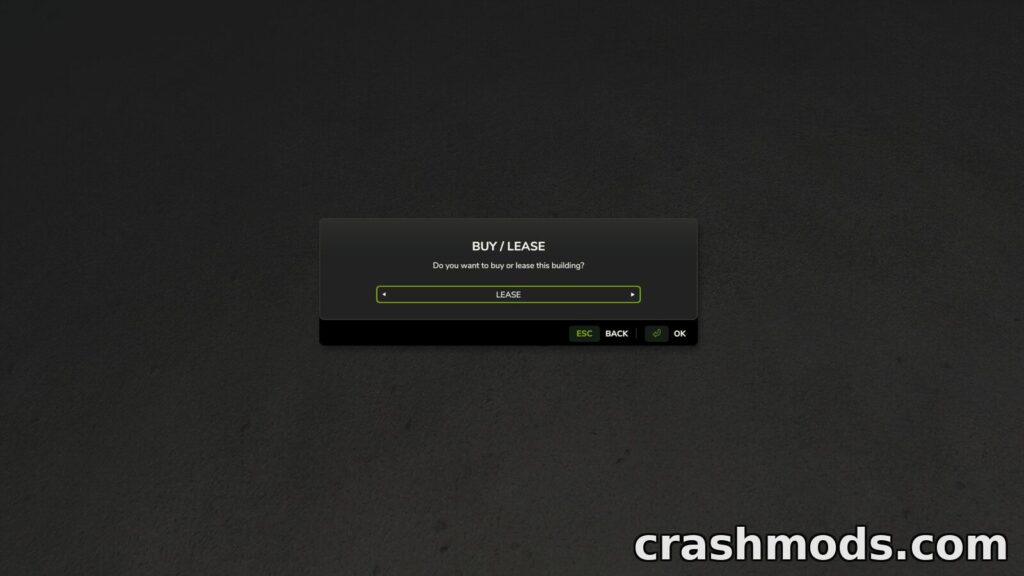
This script adds a leasing option to the purchase screen for production points that already exist on the map, instead of forcing you to buy them outright. Once you’re leasing a site, a Cancel Leasing button takes the place of the normal Sell button, and ending the lease works just like selling would.
It only applies to buildings already standing on the map, newly built placeables can’t be leased this way. It’s a small 0.15 MB script listed under Gameplay and runs on both PC and Mac.
Download Production Point Leasing – Lease Map Production Sites on CrashMods
4. Real Mower – Mow Grass Anywhere on the Map

Normally grass on land you don’t own just sits there untouched. Real Mower removes that restriction so any vehicle with the mower specialization can cut grass, bushes and weeds on non-buyable areas too, and mulchers and forestry mulchers get the same ability for clearing grass.
You switch the function on or off per vehicle, with O as the default toggle key, which you can remap in the control settings. It’s an 82 KB script that works on any map.
Download Real Mower – Mow Grass Anywhere on the Map on CrashMods
5. RealClock – On-Screen Real Time Clock
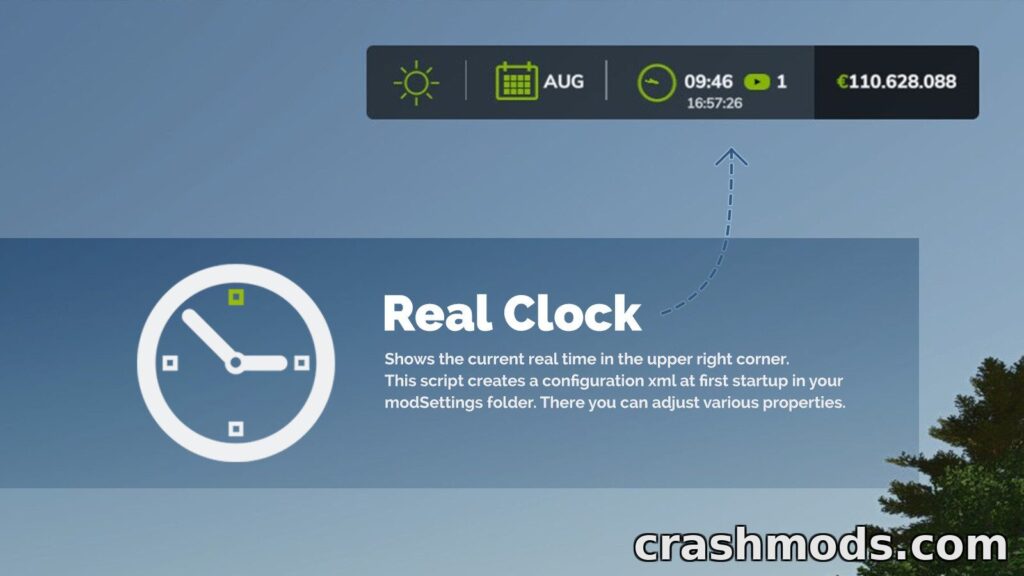
RealClock drops a real world time readout onto your screen, sitting below the in-game clock by default. On first launch it creates a configuration XML in the modSettings folder, where you can set the position as dynamic or fixed, pick a text colour, adjust font size, and customise the date and time format with tokens for weekday, month, day and year.
Both 12-hour and 24-hour formats are supported, and console commands let you adjust position and font size live, print the current settings, reset to defaults or save changes without digging through files.
Download RealClock – On-Screen Real Time Clock on CrashMods
6. Store Deliveries – Purchases Delivered for a Fee

Instead of driving to the shop to pick up a new machine and then driving it all the way home, Store Deliveries brings the purchase to a location you set from your own position. A sound confirms each delivery the moment you buy, and the delivery itself costs 2.5% of the item’s price.
You hold Left Shift + Left Alt to show a ground marker, then Left Shift + Left Alt + S to lock in the delivery spot, or Left Shift + Left Alt + X to reset it back to the store. It’s a tiny 0.20 MB script with multiplayer support.
Download Store Deliveries – Purchases Delivered for a Fee on CrashMods
7. Unlimited Color Configurations – Fully Custom Shop Colors

This small gameplay script opens up the shop’s colour options so you’re not locked into a fixed set of shades. It works across every colour configuration in the game and isn’t tied to a specific manufacturer, so it applies no matter what brand you’re buying.
At 84 KB it’s a lightweight addition, and it’s available on PC, Mac, PlayStation 5 and Xbox Series.
Download Unlimited Color Configurations – Fully Custom Shop Colors on CrashMods
8. Additional Game Settings – Extra Options Menu
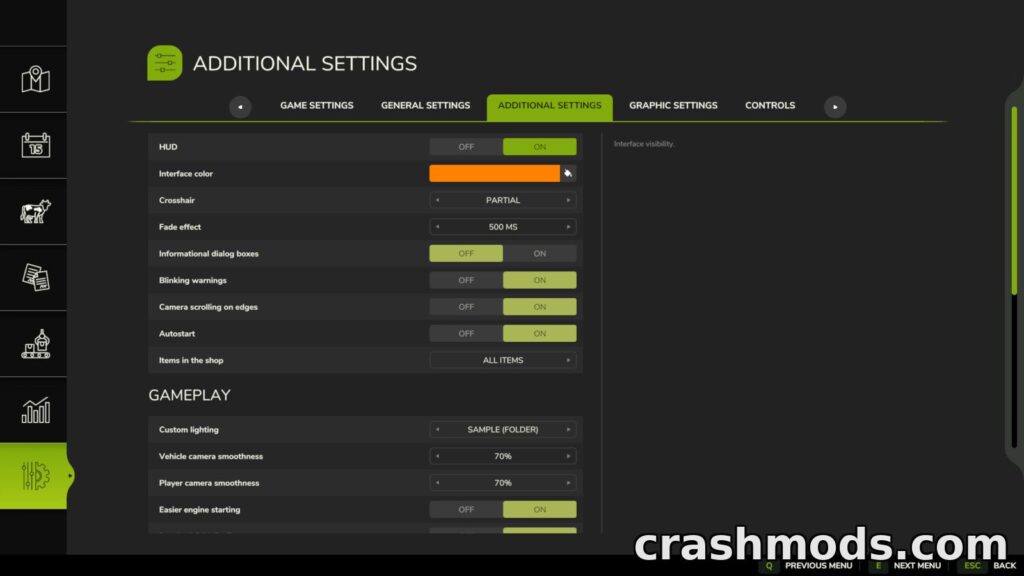
Additional Game Settings adds a whole extra tab to the pause menu packed with toggles that aren’t normally exposed, things like disabling unnecessary information windows and blinking notifications, turning on automatic saves, or adding a shop filter to separate base game items from mods and DLC.
There’s also a crosshair toggle, custom interface colours through a settings file, options for smooth camera movement and depth of field, the ability to start the engine just by pressing the acceleration key, and a quit to desktop button. It’s a lot of small quality adjustments gathered in one place.
Download Additional Game Settings – Extra Options Menu on CrashMods
9. Dashboard Live – Custom Board Computer Displays
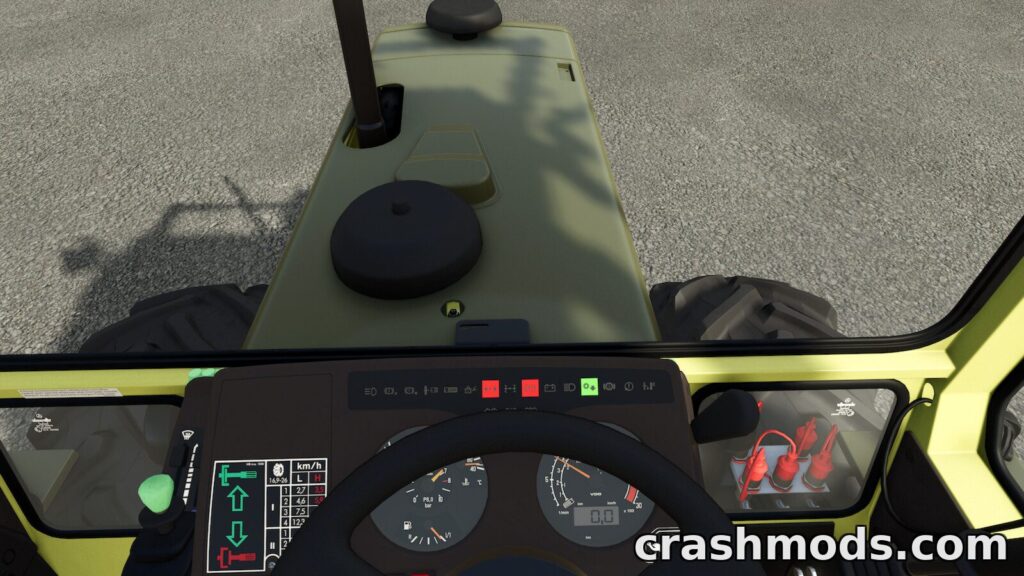
Dashboard Live fills out the board computers and dashboards in tractors from any brand with real readouts: linkage status front and rear, attached implements and trailers, fill levels, PTO status, folding and tipping status with tipping side, plus a compass that can show four points, eight points or degrees.
It also covers field number, load weight, a real-time clock, radio controls with adjustable volume, and a minimap of the area around you. Combines get their own set of readouts for fill level, straw chopper, cutting height, transfer tube position and overloading, and balers get bale size and a bale counter.
Download Dashboard Live – Custom Board Computer Displays on CrashMods
10. Realistic Cab View – First Person Cab Leaning

Realistic Cab View lets you lean inside the cabin in first person, which makes it noticeably easier to see out the windows when reversing or lining up an implement attachment. Looking out the rear window is limited to plus or minus 180 degrees, and a small amount of camera movement mimics leaning over your shoulder.
All interior cameras respect the Field of View set in your game settings, and SHIFT is the key that leans you forward. Vehicles without rear windows, like cars and trucks, get a reduced leaning range, and small cabs can occasionally show some clipping.
Download Realistic Cab View – First Person Cab Leaning on CrashMods
Tips for scripts and tools mods in Farming Simulator 25
- Install one script mod at a time and test it before adding the next, so if something misbehaves you know exactly which file caused it.
- Check each mod’s description for key bindings and rename or remap them if they clash with controls you already use.
- Back up your savegame before trying a mod that changes shop behaviour or vehicle economy, in case you want to roll back.
- If a script creates its own settings file, open it after first launch to confirm the defaults suit how you play before changing anything.
- In multiplayer, make sure every connected player runs the same scripts, since mismatched mods between host and clients tend to cause sync issues.
Browse all Farming Simulator 25 mods on CrashMods
