

Skip to content
Join our Discord for updates & support Discord

Home / Games / Farming Simulator 25 / Bredal

FS25 Bredal Mods

2 mods

Browse trending picks and fresh uploads for Farming Simulator 25—the grid below jumps straight into the catalog.

Filters
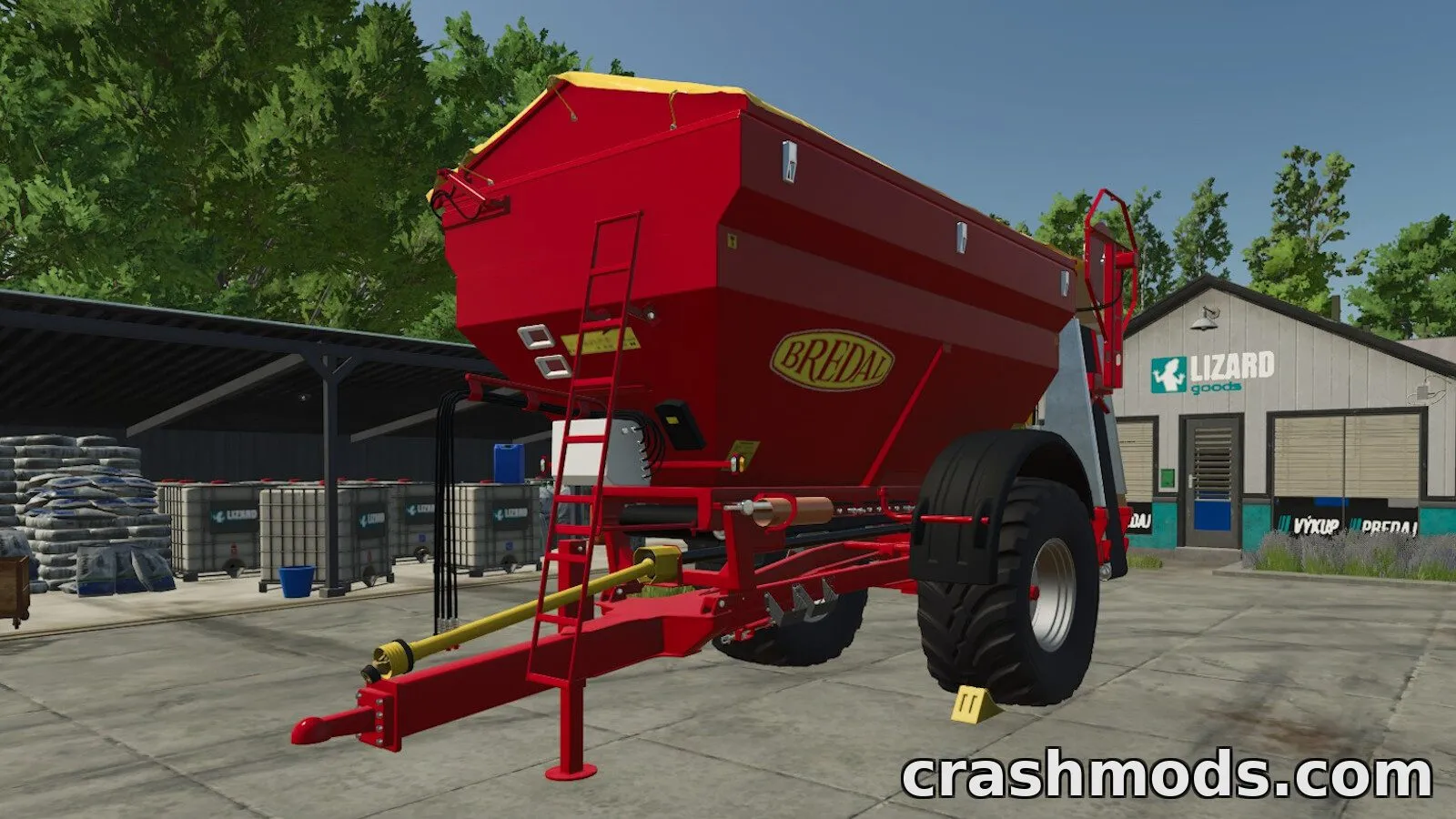
K105 42m Multi-Service – Bredal Fertilizer Spreader Farming Simulator 25 mod screenshot

A Bredal K105 spreader offering a 42 m fertilizer/lime unit and a 6 m winter road-salt unit for snow treatment in Farming Simulator 25.

  • Bredal
  • K105
  • Fertilizer Spreader
  • Lime Spreader
  • Road Salt
  • Winter Service
  • 42m Working Width
  • 6m Working Width
  • 18 kph
  • 9000L Capacity
  • 11000L Capacity
  • 14000L Capacity
  • AI Markers
  • Spreading Effects
View Mod
Updated 1w ago Views 3 Downloads 0 Likes 0 Dislikes 0 Comments 0
File Size: 4.7 MB
Bredal K 165 – 18950 l Fertilizer Spreader Farming Simulator 25 mod screenshot

A Bredal K 165 fertilizer spreader for FS25 with a capacity of 18,950 liters, an 18 kph working speed and a $78,000 price, plus base, design and rim color configurations.

  • Fertilizer Spreader
  • Bredal
  • K 165
  • 18950 Liters
  • 18 kph
  • $78000 Price
  • Color Configs
  • Base Color
  • Design Color
  • Rim Colors
  • Small Download
  • Realistic Model
  • Consoles
  • FS25
View Mod
Updated 2mo ago Views 2 Downloads 0 Likes 0 Dislikes 0 Comments 0
File Size: 4.0 MB

Farming Simulator 25 Mods and Community Downloads

Browse free Farming Simulator 25 mods, community downloads and add-ons on CrashMods. This archive helps players discover new content, compare mod pages and find updated releases faster.

  • Explore fresh and popular Farming Simulator 25 mods in one place.
  • Use categories and sorting tools to find the right download.
  • Check screenshots, descriptions and file information before downloading.

CrashMods is built for players who want a simple way to discover, browse and download community-made game mods.

Farming Simulator 25 mods — vetting, installing, common questions

🛡️ How we vet the files

1375 of the 1408 Farming Simulator 25 mods carry a finished clean VirusTotal verdict (98%).

  • Until the check finishes the upload stays hidden: nobody but you and the team can reach it.
  • 33 file(s) exceed the 650 MB automatic scan limit — VirusTotal cannot scan those and nobody checks them by hand, so scan them with your own antivirus. Their card says “size limit”.
  • The download button names the host before you leave the site — and one click reports anything that looks wrong.

💾 Installing a Farming Simulator 25 mod

Farming Simulator wants the .zip left packed.

  1. Download the .zip (leave it zipped).
  2. Copy it to Documents → My Games → FarmingSimulator20xx → mods.
  3. Tick it in the mod list when starting a new save.
  4. On an existing save, enable it in the mod menu and reload.

Full Farming Simulator installation guide →

❓ Frequently asked questions

Are the Farming Simulator 25 mods on CrashMods safe?

Uploaded files up to 650 MB are scanned with VirusTotal automatically BEFORE the mod goes public. Farming Simulator 25 currently has 1408 mods: 1375 carry a finished clean verdict, and 33 file(s) exceed the 650 MB automatic scan limit (VirusTotal cannot scan those, and nobody checks them by hand). The result is shown on each card, and you can report any mod that looks wrong.

How do I install a Farming Simulator 25 mod?

Farming Simulator wants the .zip left packed. 1) Download the .zip (leave it zipped). 2) Copy it to Documents → My Games → FarmingSimulator20xx → mods. 3) Tick it in the mod list when starting a new save. 4) On an existing save, enable it in the mod menu and reload.

Are these mods free?

The vast majority of the Farming Simulator 25 mods listed here cost nothing and download without a login. The exception is the handful of mods a creator chose to charge for: the amount is shown on the card and on the mod page, so there are no surprises.

How do I know which game version a mod fits?

Every Farming Simulator 25 mod card states the game version it was built for, and the sidebar lets you filter by version. After a game update, filter to the newest version first.