Skip to content
Join our Discord for updates & support Discord

Headland Management – Automated Turning for Field Vehicles V1.2

—/5, 0 ratings

Your rating

Creator: Jason06 / Glowins Modschmiede

File verified — safe
All 76 security engines found this file clean.
Last checked: 2026-11-07
Security report

Features:

  • Combines several vehicle functions for turning maneuvers into one button press
  • Works with tractors, field sprayers, mowers and harvesters
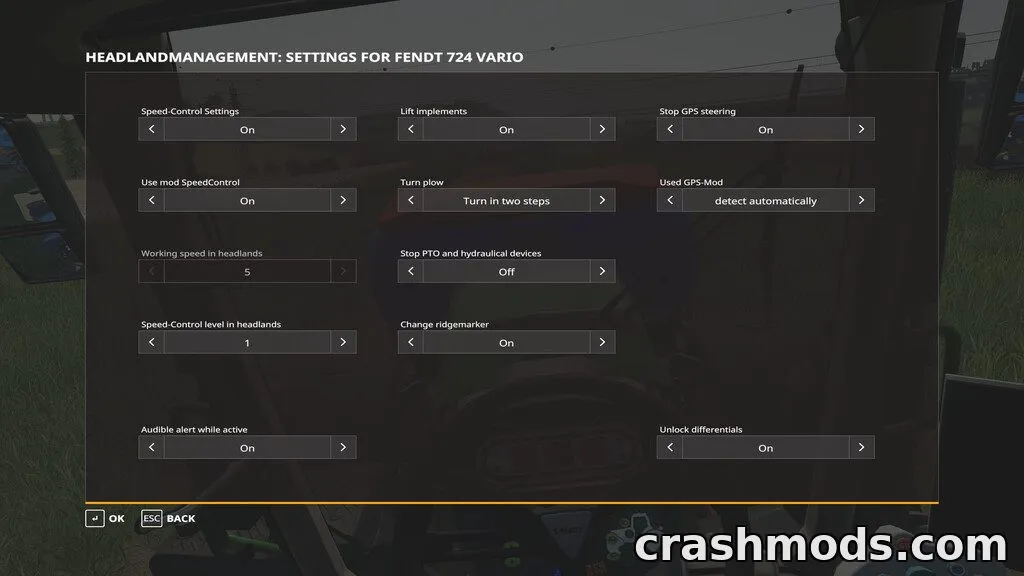
  • GUI lets you enable or disable each function individually per vehicle
  • Added as a paid configuration in the shop or workshop before use
  • Default activation key Shift-X, GUI opened with Shift+Ctrl+X
  • Reduces speed via cruise control and restores the previous setting afterward
  • Raises and lowers implements automatically during turns
  • Turns ploughs (single or two-stage) and repositions ridge markers
  • Controls crab steering and disengages/re-engages PTO and hydraulics
  • Plays a sound cue when headland management is activated
  • Not compatible with FS19_towBar or FS19_towBarWeight

Headland Management is a gameplay enhancement that bundles several vehicle actions needed for turning at the end of a field into a single button press, saving time and reducing repetitive input during fieldwork.

Once added as a configuration to a tractor, sprayer, mower or harvester, players can customize exactly which functions trigger together through an in-game GUI, including implement raising, plough turning, ridge marker adjustment, crab steering, cruise control, and PTO or hydraulics control. It also offers optional deeper integration with other steering and speed-control systems if those are installed.

This mod suits players who want smoother, faster turning sequences on the field without manually toggling each function, especially those running larger equipment that requires multiple coordinated actions per turn.

✅ Description reviewed by the CrashMods Team

Changelog

V1.2:
- Added Spanish translation
- Added support for Ifko's JohnDeerePack
- Added automatic headland activation when using Guidance Steering
- Added crab steering control
- Fixed rare issue with implements not working as expected
- Cruise control now reactivates correctly after headland management is deactivated
- Fixed game crash when tow bar mods were active
- Crab steering now works with articulated steering vehicles
- Added rear trigger for automatic headland activation
- Fixed Lua error with ridge marker switching on some DLC implements
- Improved GUI layout for high resolutions
Frequently asked questions6 questions

Headland Management – which game and version is it for?

This mod was made for Farming Simulator 19 (game version: 1.7.x). The mod's own version: V1.2. After a major game update, older mods may stop working — check the version before installing.

Headland Management – how do I install it?

Copy the .zip file to the Documents/My Games/FarmingSimulator20xx/mods folder (the folder for your game version), then enable it in the in-game mod list.

Is the download safe?

We checked the file with VirusTotal: none of the 76 antivirus engines flagged it. The full report opens from the "Verified" badge on the mod's page.

How big is the download?

The mod's file size is about 65.0 KB.

Headland Management – who made it?

The mod's original creator: Jason06 / Glowins Modschmiede.

Is the mod free?

Yes, downloading from CrashMods is free; registration is not required.

Download Get the latest version of this mod and enjoy!

Latest Mod version: V1.2 Farming Simulator 19 1.7.x just now 65.0 KB
Headland Management – Automated Turning for Field Vehicles V1.2 65.0 KB Farming Simulator 19 Download File

The file is on ModsDrop, our own storage.

  • Scannedwith VirusTotal
  • EU serversFast & reliable
  • Free downloadNo registration needed
  • Latest versionAlways up to date

More Farming Simulator 19 Scripts mods

Uploaded by

NeroVex284
NeroVex284 LITE
  • 241 mod
  • 0 follower
  • 1,891 download
  • Registered 6 months ago

Community screenshots

Screenshots from players using this mod. Add yours — images only (JPG, PNG, WebP).

No community screenshots yet — be the first!

Leave a comment