Skip to content
Join our Discord for updates & support Discord

John Deere DB120 – 48-Row Planter V1.1

—/5, 0 ratings

Your rating

Creator: JHHG Modding

File verified — safe
All 75 security engines found this file clean.
Last checked: 2026-11-09
Security report

Features:

  • 36.5m (120ft) working width
  • Plants 48 rows spaced 30 inches apart
  • Seed capacity from 3524 to 5994 liters
  • Empty weight of 18.2 tons
  • Working speed up to 15 kph (9 mph)
  • Requires 380 hp (284 kW) to operate
  • Folds into five sections for transport
  • 1578 moveable elements for added detail
  • Optional conveyor for seed refill
  • Multiple configurations including tanks, wheels, tracks, row cleaners, Starfire GPS and more
  • Realistic folding and cover-opening animations
  • Visible details like bolt threads, welds, clasps and zip ties

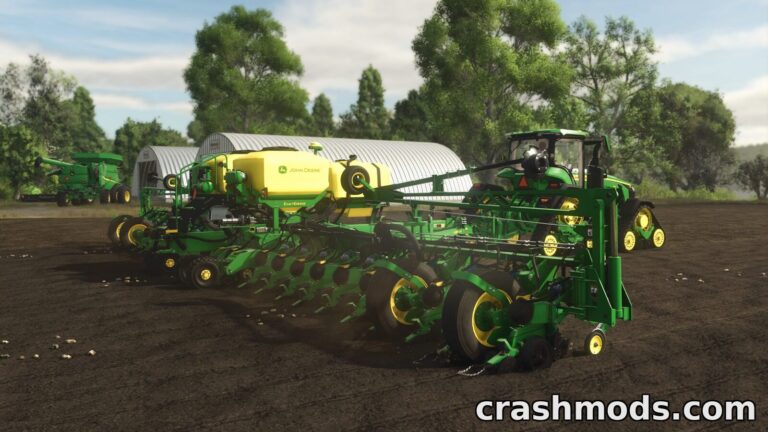
The John Deere DB120 is a massive 48-row planter modeled after the real-world machine built by Bauer Built Mfg. Known for being one of the largest production planters ever made, it brings impressive scale and realism to Farming Simulator 25.

This mod adds a wide 36.5-meter planting tool with configurable tanks, wheels, tracks, lighting, and GPS guidance systems. Players can customize nearly every aspect of the machine, from row cleaners to wheel wing covers, making it a highly detailed and adaptable addition to any large-scale farming operation.

With folding transport sections, detailed moving parts, and high working speeds of up to 15 kph, the DB120 is built for farmers who want both performance and visual authenticity. It's ideal for those managing expansive fields who need an efficient, large-capacity planting solution.

✅ Description reviewed by the CrashMods Team

Changelog

V1.1:
- Fixed sliding issue
- Improved thread and weld textures
- Fixed wear effect on several elements
- Minor bug fixes
Frequently asked questions6 questions

John Deere DB120 – which game and version is it for?

This mod was made for Farming Simulator 25 (game version: 1.25.x). The mod's own version: V1.1. After a major game update, older mods may stop working — check the version before installing.

John Deere DB120 – how do I install it?

Copy the .zip file to the Documents/My Games/FarmingSimulator2025/mods folder, then enable it in the in-game mod list.

Detailed guide

Is the download safe?

We checked the file with VirusTotal: none of the 75 antivirus engines flagged it. The full report opens from the "Verified" badge on the mod's page.

How big is the download?

The mod's file size is about 48.9 MB.

John Deere DB120 – who made it?

The mod's original creator: JHHG Modding.

Is the mod free?

Yes, downloading from CrashMods is free; registration is not required.

What’s inside the package?50 files · 83.8 MB unpacked3D models 2Textures 37Config & text 9Other files 2Show filesHide files

Folders, file names and sizes, read from the downloadable archive.

Package
  • DB120_decalsDiffuse.dds5.3 MB
  • DB120_decalsNormal.dds682.8 KB
  • DB120_normal.dds10.7 MB
  • DB120_vmask.dds10.7 MB
  • digiStar_decal.dds1.3 MB
  • DigiStar_normal.dds682.8 KB
  • brand_camso.dds128.1 KB
  • broadBKT.xml921 B
  • broadTRELLEBORG.xml950 B
  • camsoTracks_db120.xml651 B
  • defaultBKT.xml745 B
  • wheels.i3d22.3 KB
  • icon_DB120.dds128.1 KB
  • JD_DB120.xml489.7 KB
  • JohnDeereDB120.i3d1.2 MB
  • JohnDeereDB120.i3d.shapes20.3 MB
1–20 / 221 / 2

Download Get the latest version of this mod and enjoy!

Latest Mod version: V1.1 Farming Simulator 25 1.25.x 13 hours ago 48.9 MB
John Deere DB120 – 48-Row Planter V1.1 48.9 MB Farming Simulator 25 Download File

The file is on ModsDrop, our own storage.

  • Scannedwith VirusTotal
  • EU serversFast & reliable
  • Free downloadNo registration needed
  • Latest versionAlways up to date

More Farming Simulator 25 Implements and Tools › Seeders mods

Uploaded by

Kiro_8036
Kiro_8036 LITE
  • 709 mod
  • 0 follower
  • 1,684 download
  • Registered 2 months ago

Community screenshots

Screenshots from players using this mod. Add yours — images only (JPG, PNG, WebP).

No community screenshots yet — be the first!

Leave a comment