Skip to content
Join our Discord for updates & support Discord

Simple Grocery Purchasing – In-Game Shopping Menu V3.8

0 downloads
33.8 KB file size
0 comments
0 videos
The Sims 4 More Sims 4 Mods Explore more high-quality The Sims 4 mods. Browse Mods

—/5, 0 ratings

Your rating

Creator: bloombatter

File verified — safe
All 75 security engines found this file clean.
Last checked: 2026-11-01
Security report

Features:

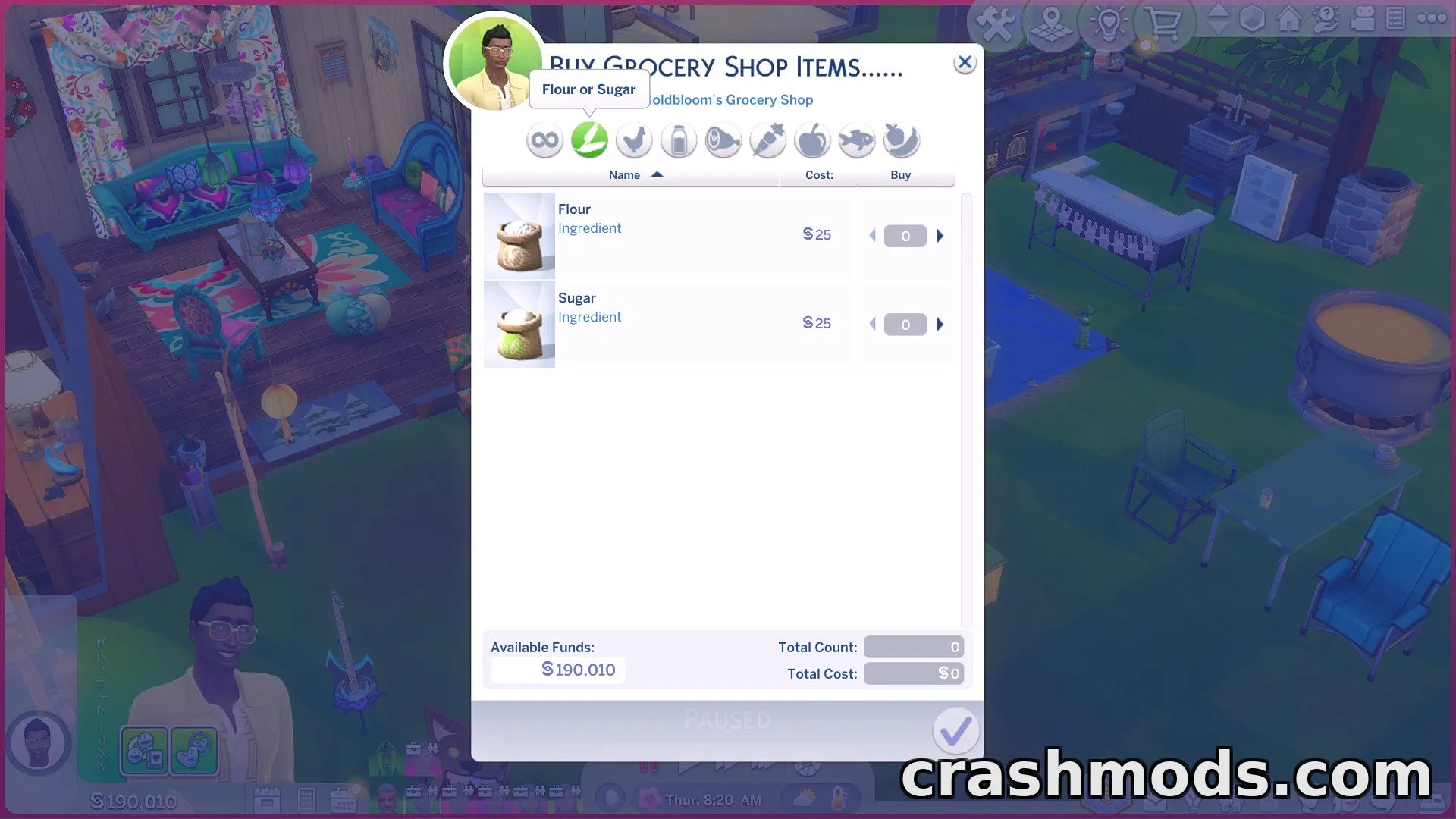
  • Adds a purchase menu to phones, computers, and refrigerators
  • Buy Cottage Living and Horse Ranch grocery items directly from home
  • Purchased items appear instantly in the Sim's inventory
  • Computer purchases also work from laptops carried in inventory
  • Refrigerator purchases limited to lots owned by the active household
  • Independent custom tuning that does not overwrite the base game's grocery shop
  • Garden shop adds Meat Substitute, honey, and Gardening Skill seed packs
  • Rare seed packs appear in a Special category
  • Werewolves pack content adds raw meat and Moonpetal tied to moon phases
  • Horse Ranch shop includes nectar types, including occult nectar and rare Horse Ambrosia
  • More category buttons than regular stalls, though prices are slightly higher
  • No purchase limit, unlike buying from in-game stalls

This mod brings the convenience of grocery shopping straight to your Sim's home by adding a dedicated purchase menu accessible through phones, computers, and refrigerators. Instead of visiting a stall, Sims can order items that appear instantly in their inventory.

The shopping lists cover items from the Cottage Living and Horse Ranch grocery and garden shops, with extra additions like Meat Substitute, honey, seed packs, and nectar varieties. Werewolves-related content adds items such as raw meat and Moonpetal that appear during specific moon phases, while Horse Ranch adds a rotating nectar selection including rare occult types.

Its tuning works independently from the base game's grocery system, so it won't conflict with or replace existing shop mechanics. The mod's file structure is modular, letting players choose which purchase methods—phone, computer, or refrigerator—they want to use.

This mod is ideal for players who enjoy expanded shopping options and want easier access to grocery and garden items without needing to visit in-game stalls.


✅ Description reviewed by the CrashMods Team

Changelog

V3.8:
- Fixed and adjusted tuning
- Items purchased from the refrigerator now appear in its inventory
- Added Moonpetal to the Gardening Shop list
- Adjusted snippet tuning
- Updated purchase lists for the garden shop and Horse Ranch shop
Frequently asked questions6 questions

Simple Grocery Purchasing – which game and version is it for?

This mod was made for The Sims 4. The mod's own version: V3.8. After a major game update, older mods may stop working — check the version before installing.

Simple Grocery Purchasing – how do I install it?

Put the .package files in the Documents/Electronic Arts/The Sims 4/Mods folder and enable custom content in the game settings.

Is the download safe?

We checked the file with VirusTotal: none of the 75 antivirus engines flagged it. The full report opens from the "Verified" badge on the mod's page.

How big is the download?

The mod's file size is about 33.8 KB.

Simple Grocery Purchasing – who made it?

The mod's original creator: bloombatter.

Is the mod free?

Yes, downloading from CrashMods is free; registration is not required.

Download Get the latest version of this mod and enjoy!

Latest Mod version: V3.8 The Sims 4 All versions 1 minute ago 33.8 KB
Simple Grocery Purchasing – In-Game Shopping Menu V3.8 33.8 KB The Sims 4 Download File

The file is on ModsDrop, our own storage.

  • Scannedwith VirusTotal
  • EU serversFast & reliable
  • Free downloadNo registration needed
  • Latest versionAlways up to date

More The Sims 4 Mods mods

Uploaded by

AxelDrift57
  • 390 mod
  • 0 follower
  • 1,212 download
  • Registered 3 months ago

Community screenshots

Screenshots from players using this mod. Add yours — images only (JPG, PNG, WebP).

No community screenshots yet — be the first!

Leave a comment