Skip to content
Join our Discord for updates & support Discord

Need For Speed MW05 UI – Vehicle HUD App Pack V1.3

—/5, 0 ratings

Your rating

Creator: deliciousTic-Tac

File verified — safe
All 75 security engines found this file clean.
Last checked: 2026-11-11
Security report

Features:

  • For BeamNG.drive 0.40.x
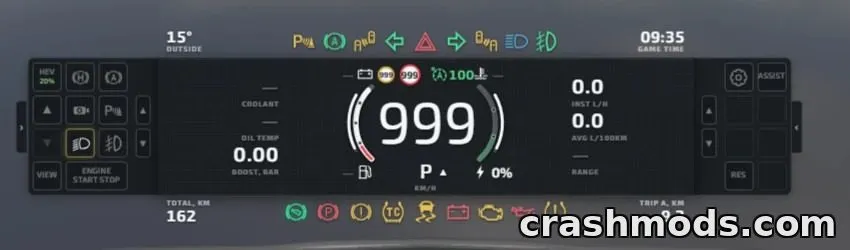
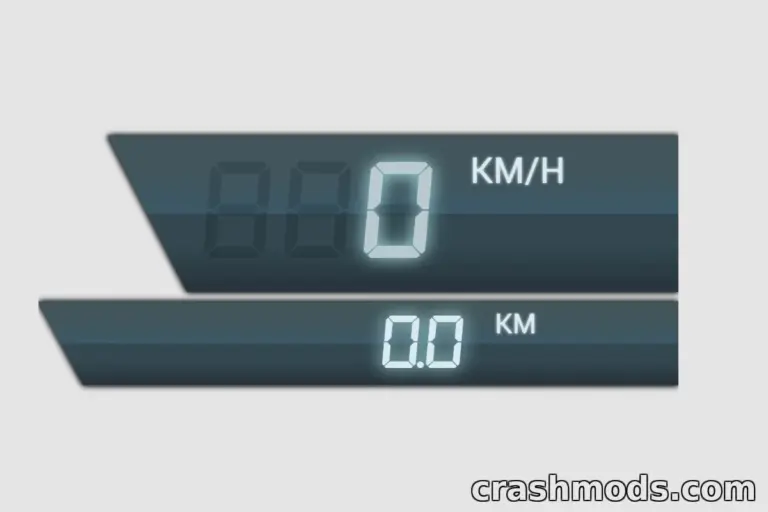
  • Complete vehicle HUD with tachometer, speedometer, gear indicator, fuel and coolant gauges
  • NOS gauge with color states for deactivated, activated, and injection modes
  • Circular minimap display
  • Forced induction gauge showing turbo or supercharger pressure in PSI or bar
  • Engine monitoring gauges for oil pressure, oil temperature, and battery voltage
  • Digital AFR display
  • Interactive ignition switch with OFF, ACC, ON, and START positions
  • ESC and drive-mode controls included
  • Powertrain app with transfer case, rangebox, differential locks, and axle disconnect controls
  • All apps resizable and movable via the in-game Apps menu
  • Made by deliciousTic-Tac

This UI pack brings a complete set of custom dashboard apps to BeamNG.drive, styled after the iconic interface from Need for Speed: Most Wanted 2005. It replaces default gauges with a more dynamic and detailed HUD experience.

The pack includes a full vehicle HUD covering speed, RPM, fuel, and temperature readings, along with specialized gauges for turbo pressure, oil stats, and air-fuel ratio. A dedicated powertrain app adds visual controls for transfer cases, differential locks, and axle disconnects when supported by the vehicle.

It's designed for players who enjoy a stylized, racing-game-inspired interface and want more visual feedback from their vehicle's systems, all customizable through the standard in-game Apps menu.

✅ Description reviewed by the CrashMods Team

Changelog

V1.3:
- Added new MW05 Powertrain Dial app
- Standardized front, rear, and center differential icons across both Powertrain apps
- NOS gauge now changes color: grey when deactivated, orange when activated, blue during injection
- Fixed NOS level display so system activation is no longer confused with tank level
- Speed, pressure, and oil temperature units now adjust automatically
Frequently asked questions6 questions

Need For Speed MW05 UI – which game and version is it for?

This mod was made for BeamNG.drive (game version: 0.40.x). The mod's own version: V1.3. After a major game update, older mods may stop working — check the version before installing.

Need For Speed MW05 UI – how do I install it?

Copy the downloaded .zip file (without extracting it) to the Documents/BeamNG.drive/<version>/mods folder, then enable it in the in-game Mod Manager.

Detailed guide

Is the download safe?

We checked the file with VirusTotal: none of the 75 antivirus engines flagged it. The full report opens from the "Verified" badge on the mod's page.

How big is the download?

The mod's file size is about 1.5 MB.

Need For Speed MW05 UI – who made it?

The mod's original creator: deliciousTic-Tac.

Is the mod free?

Yes, downloading from CrashMods is free; registration is not required.

What’s inside the package?47 files · 1.8 MB unpackedScripts & code 10Textures 16Config & text 11Other files 10Show filesHide files

Folders, file names and sizes, read from the downloadable archive.

Scripts & code — names only, these files cannot be opened: app.js +9 more

Package
  • icon.jpg7.0 KB
  • info.json6.9 KB
1–9 / 9

Download Get the latest version of this mod and enjoy!

Latest Mod version: V1.3 BeamNG.drive 0.40.x 5 minutes ago 1.5 MB
Need For Speed MW05 UI – Vehicle HUD App Pack V1.3 1.5 MB BeamNG.drive Download File

The file is on ModsDrop, our own storage.

  • Scannedwith VirusTotal
  • EU serversFast & reliable
  • Free downloadNo registration needed
  • Latest versionAlways up to date

More BeamNG.drive UI mods

Uploaded by

WestonFly
WestonFly LITE
  • 1,079 mod
  • 0 follower
  • 10,161 download
  • Registered 6 months ago

Community screenshots

Screenshots from players using this mod. Add yours — images only (JPG, PNG, WebP).

No community screenshots yet — be the first!

Leave a comment