Skip to content
Join our Discord for updates & support Discord

Ibishu Covet – Digital A-Pillar Gauge Pod V1.2.1

—/5, 0 ratings

Your rating

Creator: likeBloodMoon

File verified — safe
All 74 security engines found this file clean.
Last checked: 2026-11-16
Security report

Features:

  • For BeamNG.drive 0.40.x
  • Made by likeBloodMoon
  • Digital instrument cluster with tachometer, speed, gear, fuel and coolant bars
  • Six display pages: Boost, Tyres, Engine, Brakes, G-Force and Trip
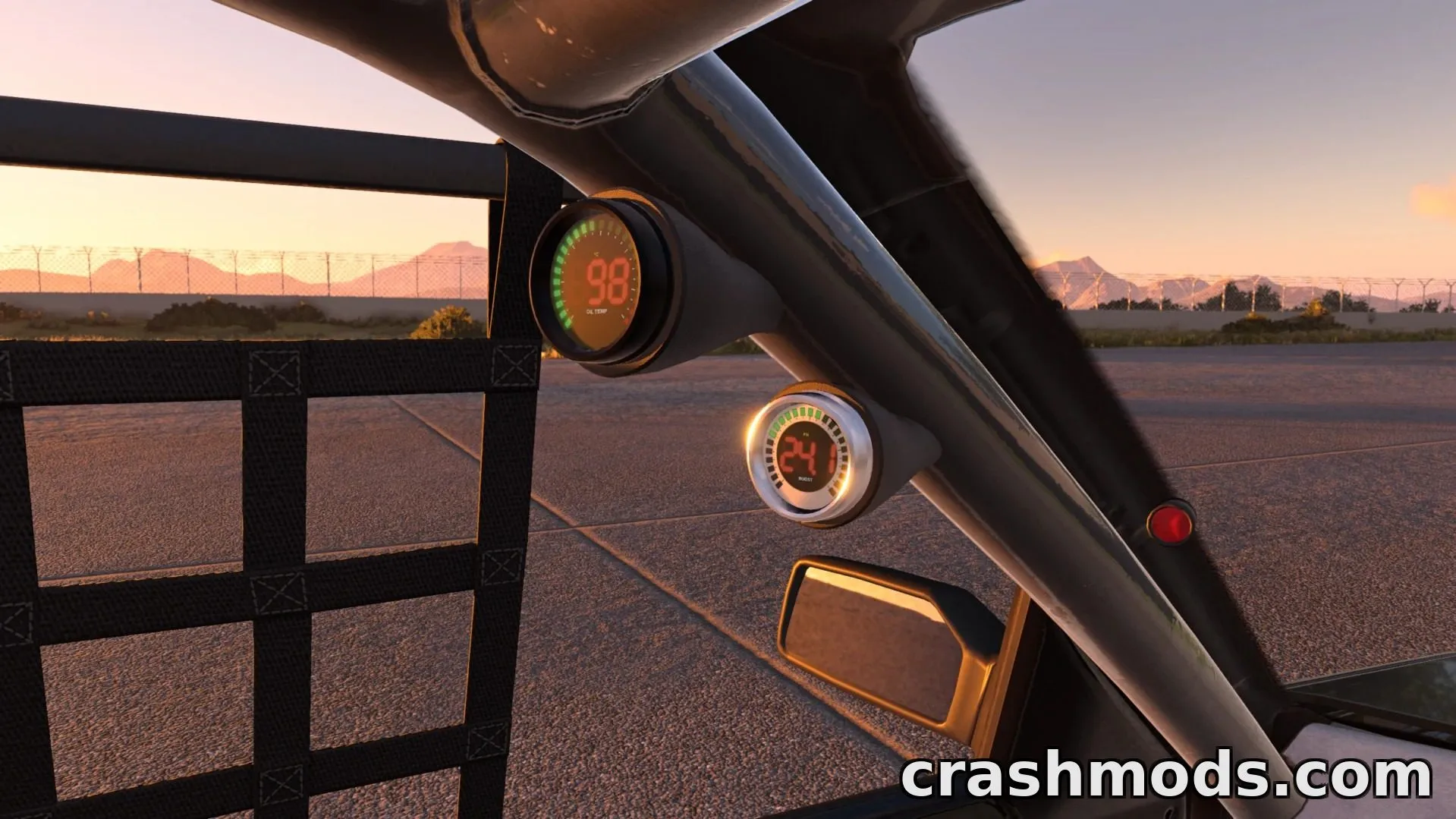
  • Boost gauge with LED ring, automatic wastegate-based scaling, peak hold/recall, overboost warning and start-up sweep
  • Oil temperature gauge with cold-oil indicator and high-temperature warning
  • Black or silver bezel color options
  • Automatic night-time dimming and tuning sliders for brightness and warning points
  • Automatic mounting for standard, stripped or roll cage interiors, including fixed and RHD positions
  • Currently available for the Ibishu Covet only
  • Uses the Covet's Additional Modification slot, so it cannot be combined with other mods using the same slot

Pillar Pod Digital Gauges is a BeamNG.drive add-on that mounts a digital gauge pod onto the A-pillar of the Ibishu Covet, giving the car a modern instrument readout alongside its stock dashboard.

The pod includes a full digital cluster with a bar tachometer, large speed and gear display, and fuel and coolant bars, plus six selectable pages covering boost, tyres, engine, brakes, G-force and trip data. Drivers can fit a dedicated boost gauge with an LED ring and automatic wastegate scaling, an oil temperature gauge with cold and overheat warnings, or both at once.

Customization options let users pick black or silver bezels, enable automatic night dimming, and fine-tune warning thresholds and brightness through in-game sliders. The pod also repositions itself automatically depending on whether the Covet has a standard, stripped or roll cage interior, with fixed and right-hand-drive placements supported.

This mod suits Covet owners who want a more detailed, customizable gauge setup for monitoring boost and oil temperature, especially in builds focused on tuning or forced induction.

✅ Description reviewed by the CrashMods Team

Changelog

V1.2.1 — First release.
Frequently asked questions6 questions

Ibishu Covet – which game and version is it for?

This mod was made for BeamNG.drive (game version: 0.40.x). The mod's own version: V1.2.1. After a major game update, older mods may stop working — check the version before installing.

Ibishu Covet – how do I install it?

Copy the downloaded .zip file (without extracting it) to the Documents/BeamNG.drive/<version>/mods folder, then enable it in the in-game Mod Manager.

Detailed guide

Is the download safe?

We checked the file with VirusTotal: none of the 74 antivirus engines flagged it. The full report opens from the "Verified" badge on the mod's page.

How big is the download?

The mod's file size is about 7.8 MB.

Ibishu Covet – who made it?

The mod's original creator: likeBloodMoon.

Is the mod free?

Yes, downloading from CrashMods is free; registration is not required.

What’s inside the package?29 files · 15.5 MB unpackedScripts & code 23D models 1Textures 14Config & text 9Other files 3Show filesHide files

Folders, file names and sizes, read from the downloadable archive.

Scripts & code — names only, these files cannot be opened: dbgAmbient.lua, dbgCluster.lua

Package
  • icon.jpg6.2 KB
  • info.json6.0 KB
  • bx_pillar_pod_gauges.jbeam127.4 KB
  • covet_pillar_pod_gauges.jbeam185.5 KB
1–16 / 16

Download Get the latest version of this mod and enjoy!

Latest Mod version: V1.2.1 BeamNG.drive 0.40.x 9 minutes ago 7.8 MB
Ibishu Covet – Digital A-Pillar Gauge Pod V1.2.1 7.8 MB BeamNG.drive Download File

The file is on ModsDrop, our own storage.

  • Scannedwith VirusTotal
  • EU serversFast & reliable
  • Free downloadNo registration needed
  • Latest versionAlways up to date

More BeamNG.drive Other mods

Uploaded by

WestonFly
WestonFly LITE
  • 1,212 mod
  • 0 follower
  • 13,396 download
  • Registered 6 months ago

Community screenshots

Screenshots from players using this mod. Add yours — images only (JPG, PNG, WebP).

No community screenshots yet — be the first!

Leave a comment