Skip to content
Join our Discord for updates & support Discord

Age Your Sims – Bulk Life Stage Aging Tool V1.2

0 downloads
29.0 KB file size
0 comments
0 videos
The Sims 4 More Sims 4 Mods Explore more high-quality The Sims 4 mods. Browse Mods

—/5, 0 ratings

Your rating

Creator: baciaangi

File verified — safe
All 75 security engines found this file clean.
Last checked: 2026-10-31
Security report

Features:

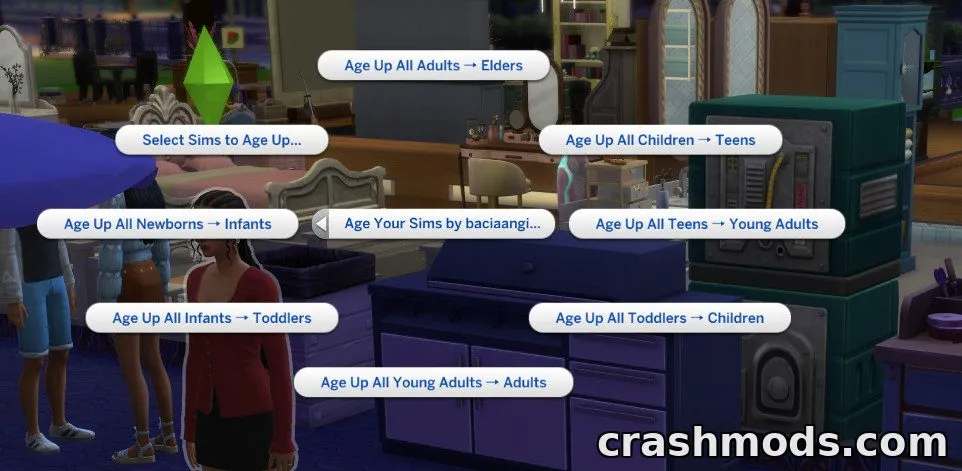
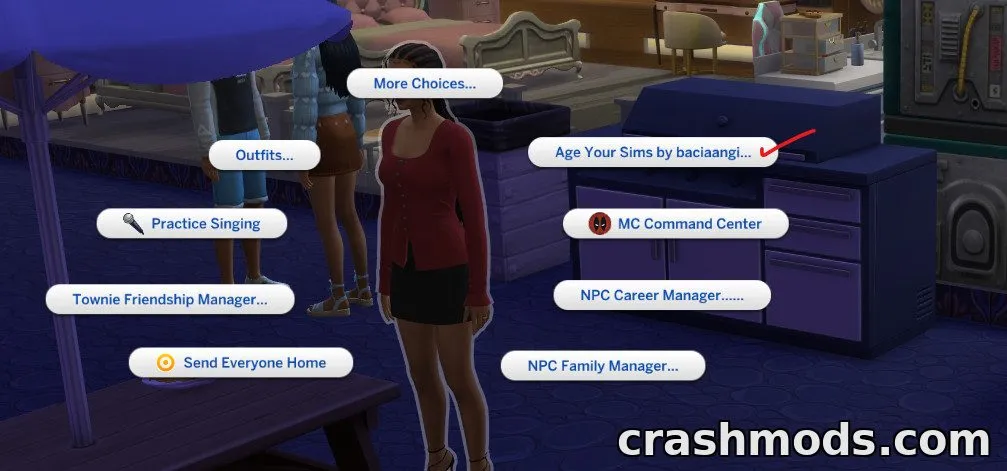
  • Adds a menu accessible from your active Sim or any mailbox
  • Opens a picker listing every eligible Sim, sorted by life stage
  • Shows each Sim's current age, next stage, and household
  • Lets you select up to 20 Sims to age up together
  • Includes one-click bulk aging for each stage: Newborn to Infant, Infant to Toddler, Toddler to Child, Child to Teen, Teen to Young Adult, Young Adult to Adult, and Adult to Elder
  • Shows a confirmation dialog before any aging occurs
  • Automatically skips Elders, pregnant Sims, occults, ghosts, deceased Sims, and pets
  • Aging applied through the mod cannot be undone
  • Requires the XML Injector script to function
  • Base game compatible, no expansion packs needed
  • Latest update adds translation support for other languages

Age Your Sims is a gameplay script mod for The Sims 4 that gives players direct control over aging instead of waiting for birthdays. Opening the menu from an active Sim or a mailbox brings up a picker showing every eligible Sim in the world along with their current age, life stage, and household.

The mod adds both individual and bulk aging options, letting you age up to 20 Sims at once or trigger a one-click transition for an entire life stage, from newborns all the way to elders. Every action requires confirmation first, so nothing changes unexpectedly, and certain Sims such as elders, pregnant Sims, occults, ghosts, and pets are automatically excluded.

It's a handy tool for players managing large households, legacy saves, or worlds with many Sims who want faster control over aging without manually clicking through each birthday. Since aging applied this way can't be reversed, saving beforehand is recommended.

✅ Description reviewed by the CrashMods Team

Changelog

V1.2:
- Added translation support for other languages
Frequently asked questions6 questions

Age Your Sims – which game and version is it for?

This mod was made for The Sims 4. The mod's own version: V1.2. After a major game update, older mods may stop working — check the version before installing.

Age Your Sims – how do I install it?

Put the .package files in the Documents/Electronic Arts/The Sims 4/Mods folder and enable custom content in the game settings.

Is the download safe?

We checked the file with VirusTotal: none of the 75 antivirus engines flagged it. The full report opens from the "Verified" badge on the mod's page.

How big is the download?

The mod's file size is about 29.0 KB.

Age Your Sims – who made it?

The mod's original creator: baciaangi.

Is the mod free?

Yes, downloading from CrashMods is free; registration is not required.

Download Get the latest version of this mod and enjoy!

Latest Mod version: V1.2 The Sims 4 All versions 1 minute ago 29.0 KB
Age Your Sims – Bulk Life Stage Aging Tool V1.2 29.0 KB The Sims 4 Download File

The file is on ModsDrop, our own storage.

  • Scannedwith VirusTotal
  • EU serversFast & reliable
  • Free downloadNo registration needed
  • Latest versionAlways up to date

More The Sims 4 Mods mods

Uploaded by

RavenByte73
  • 2,876 mod
  • 1 follower
  • 6,801 download
  • Registered 5 months ago

Community screenshots

Screenshots from players using this mod. Add yours — images only (JPG, PNG, WebP).

No community screenshots yet — be the first!

Leave a comment